
Everything Wanigan does.
The editor for your sites, the agents that work beside it, and the board that keeps track of both. Each feature links to its docs; each is tied to a test in the app’s own feature table.
The editor
Change the page itself.
Your local site, inside Wanigan, edited where you see it. The same moves on Drupal and WordPress.
Type on the pageNew in beta.5
Choose a part and press E, or double-click its words: they become editable where they are, and every keystroke changes the page itself. Enter keeps the change in the layer; Esc puts the site’s words back exactly.
Docs: Type on the pageStyles, liveNew in beta.5
Try a style the same way, on this element or on every one of its kind: each value shows on the page as you move it. Lengths are sliders bound to number boxes in pixels, with weight by name, alignment, and padding and margins side by side. A colour’s swatch opens the site’s own colours, grouped by where each came from: WordPress’s declared palette (through the site helper, version 5), the theme’s tokens, and the colours the page uses. A token is written as its var() reference.
Docs: Styles, liveThe design layerNew in beta.5
What you retype and the styles you try wait in a layer of their own, keyed to the part they belong to, so they survive a reload and never land on whatever moves into a part’s place. Edits lists them, with undo and redo.
Docs: The design layerMake it realNew in beta.5
Words are saved through the site itself, to the one thing that holds exactly those words: a field on Drupal as a new revision by you, through the content that holds a paragraph; on WordPress a title, a block’s text, a menu label, a template’s words. Refused in plain words when someone saved it since, a newer draft waits, or the workflow says no.
Docs: Make it realVerifyNew in beta.5
After a save, Wanigan renders the page at a phone’s and a desktop’s width and compares it with what you designed: the styles of what you touched, the pixels around it, and the rest of the page part by part, so a change that reached too far is caught and a line that rewraps is not. Each page is measured at one screen’s height and pictured whole, so a page built to fill the screen measures the same every time. A style is verified the same way once it is in the theme: found, it is Verified; not there yet, it names the first differences and stays a draft. One Verify checks every edit on an element together, its words and its style alike.
Docs: VerifyCompare
Lay your local page over the same page on Dev, Test or Live: slider, onion skin, difference, flip or side by side, each difference named by the part it touches. Hosted pages are read-only, in a private session.
Docs: CompareThe page as visitors see itNew in beta.5
One switch (☰) hides the site’s admin bars, Drupal’s Navigation and Toolbar or WordPress’s admin bar, while you stay logged in. Drupal’s own status messages are hidden in the page, and said in Wanigan’s own pop-up and its notification tray instead.
Docs: The page as visitors see itGo to
Shift+Space finds any page, piece of content, term, view or admin screen of the site, forgiving typos, and remembers what you open most.
Docs: Go to
Made by
See what made every part.
Point at anything and know where it came from, before you change it.
The trace
Every part of the page with the chain that made it: the template and its file, the block, component or pattern, the content and field, and the module, plugin or theme, nested as the page nests them. Drupal 10.3 to 11.4 and WordPress, through core.
Docs: The traceParts keep their names
Each part a helper can name keeps its identity across reloads and reorders: entities, fields and items, components, blocks, Layout Builder components, menus and views on Drupal; posts, terms, fields and blocks on WordPress.
Docs: Parts keep their namesWhere it’s usedNew in beta.5
For any component, block or pattern, every place the site uses it: placements, layouts, templates, posts, synced patterns and widgets, each opening in the editor, with what the search can’t see said plainly.
Docs: Where it’s usedThe request
What the page cost: its hooks in the order they fired, its queries slowest first or by caller (each outlining its part), its assets and its logs.
Docs: The request
Components
What the site can place.
The site’s own building blocks, pictured in its own theme.
The libraryNew in beta.5
Every component, block, pattern and block style the site’s core can place, pictured alone in the site’s own theme at a phone’s and a desktop’s width, with its props, slots and files. Drag one onto the page, or Place and click.
Docs: The libraryTake outNew in beta.5
Removes a placed part through the site’s own save path, never what it showed. Anything shared says where else it shows and asks first, and Undo puts it back.
Docs: Take out
Hand it to an agent
Show it, and an agent starts on it.
The fastest way to tell an agent what’s wrong is to show it.
SnapNew in beta.5
Takes the view’s picture before anything covers it, or the whole page, to mark up: a box, an arrow, a highlight, a label, and a blur that replaces the pixels under it. Ask an agent sends it with the parts it covers, what made each, and the page’s errors, words you can read and edit first.
Docs: SnapRecordNew in beta.5
Records the view’s own frames and a step log: clicks and what they were on, keys, typing with its field’s label, pages, console errors, slow or failed requests. Never a password, a one-time code or a request’s body. The agent gets the key frames and the steps, never the video.
Docs: RecordStraight to an agentNew in beta.5
Sent to the agent already working in the project, or, with none running, one click starts Claude Code, Codex or Gemini CLI with it as its first message. Nothing starts without that click.
Docs: Straight to an agentStyles as a briefNew in beta.5
A style you tried in the layer goes to an agent as a brief, with the files that made the part, to build properly in the theme. Once it is there, Verify on the draft finds it in the site and the edit is finished.
Docs: Styles as a briefWatch it work
The live view follows the agent’s edits as it saves files, outlining what each one changed, so you see the page move while the agent works.
Docs: Watch it work
Developer tools
The developer’s tools, beside the page.
Everything you would open a browser’s tools for, docked under the page you are editing.
DevTools in the dockNew in beta.5
The page’s own DevTools (elements, console, network, sources) as a tab beneath it: ⌥⌘I on a Mac, Ctrl+Shift+I on Windows and Linux. Show in DevTools (⇧D) points it at the part you chose.
Docs: DevTools in the dockThe code editor
The project’s files beside the page, with syntax for PHP, Twig, JavaScript, CSS and more. It refuses to edit core, contributed and vendor code, saves only what you saw, and the page reloads as you save.
Docs: The code editorProblems and the request
The page’s errors, and what it cost to render, in the same dock, each pointing at the part it belongs to.
Docs: Problems and the request
Drupal and WordPress
One editor, every way a site is built.
Through each platform’s own core, with adapters for the plugins and builders sites really use. More platforms are coming.
Drupal
Core 10.3 to 11.4. Fields, Paragraphs (saved through the content that holds them), Layout Builder (inline blocks through their layout), blocks, menus, single-directory components, and Webform through its own API.
Docs: DrupalWordPress
Blocks and their formatted text, classic themes and their template words, menus, widgets, synced patterns, an image’s alt text, ACF fields through ACF’s own save, and Elementor through its own document save.
Docs: WordPressKeeping up with plugins
Each adapter declares the plugin calls it saves through and the versions checked. An update that removes one is refused by name; a newer version still saves, and says it isn’t verified yet.
Docs: Keeping up with pluginsHonest refusals
When Wanigan won’t save something it says why: either the platform keeps no such thing, or Wanigan doesn’t do it yet.
Docs: Honest refusalsThe helper
A small module or plugin, written into a local site only when you install it, after showing what it writes and runs, kept out of git, and removed with one click. This release carries the Drupal helper at version 4 and the WordPress helper at version 5: a site set up with an older one says so, and one Update the helper click rewrites only the helper’s own folder.
Docs: The helper
Help
Every view explains itself.
So you know what you are doing before you do it.
ToursNew in beta.5
A welcome tour on the first launch, and a short tour of each view the first time you open it. The compass in the status line plays it again whenever you like.
Docs: ToursHow this worksNew in beta.5
Every view that is more than a simple form draws its rules as a picture, with live numbers: who does what, the usual path, and the way back.
Docs: How this worksKeys and the palette
⌘K (Ctrl+K) finds any project, card, session, page or command, with its key. ? lists every shortcut, with each platform’s own keys.
Docs: Keys and the paletteVoice inputNew in beta.5
Speak instead of typing in the boxes you write in: a note, a message to a session, a recording’s narration. Whisper turns speech into text on your computer; its model downloads once, when you ask, and the audio never leaves it. Not yet tried with a real microphone.
Docs: Voice input
Agents and the board
Your agents, without losing track.
A board for every project, one agent per card in a real terminal, nothing done without your approval, and one list of what needs you.
Claude Code and Codex on a board, Needs you, review and git, in the demo. The captions are in the picture, and its music starts muted.
01The problem
Two or three agents is where you lose the thread.
- An agent sits on a permission prompt, and you don’t notice.
- Another says it’s done, and it isn’t.
- A change shows up, and you can’t tell which session made it.
A better model doesn’t fix that, and more terminals make it worse. It’s a process problem.
02The workflow
The workflow.
This is the part worth taking away. It works with any tool, even a whiteboard.
Decide what “done” means first.
Write acceptance criteria on the card before anyone starts. The agent is told its card when it starts.
Agents file work. They don’t pick it.
What an agent finds lands in an Inbox. You accept it to Ready, and only then can an agent take it.
One agent per card, in a real terminal.
Start Claude Code, Codex, Gemini CLI or a shell on a card. It holds the card while it runs, on its own branch if you want.
Nothing reaches review without evidence.
A file, a link or a note: a test log, a screenshot, a URL. No evidence, no Review.
Only you mark it done.
Approve it, or send it back with a note the agent sees. If a done card turns out not fixed, reopen it: what’s still wrong becomes a new criterion.
One list says when you’re needed.
Needs you gathers permission prompts, reviews, questions, failures and finished turns from every project, most urgent first.
The lineup.
You decide what gets built and what counts as done. Agents file cards and do the work in real terminals, Jev reads what comes in, and nothing reaches Done until you approve it.
- YouYou file a card. Yours go straight to Ready, unless you put them in the Inbox.
- AgentsAgents file what they find. What an agent files always lands in the Inbox, for you.
- JevJev reads each new card. What to do with it, how much it matters, and whether it repeats another card. Advice, unless this project lets Jev accept confident cards.
- You
Inbox
Accept it to Ready, archive it, or start a session on it, which accepts it. Agents cannot take a card from the Inbox.
Rule 2you accept - The board
Ready
Accepted work. Acceptance criteria say what done means, and the agent is told them when it starts.
Rule 1a session takes it - Agents
Working
Claude Code, Codex or a shell, in a real terminal that keeps running when the window closes. It claims the card for 30 minutes at a time, renewed while it runs.
Rule 3with evidence - You
Review
Only with evidence: a file, a link or a note. Ask Claude to check it against each criterion if you like; that is advice.
Rule 4you approve - The board
Done
Only you approve. An agent can never mark its own work done.
Rule 5
When it goes wrong
- A session stops back to Ready
Its claim is released and the card returns to Ready. Notes, evidence and history stay on the card.
- Send back back to Ready
Not right yet? It goes back to Ready with your note, and the next session is told it.
- Reopen back to Ready
Done, but not fixed? Reopen it and say what is still wrong; that becomes a new criterion.
- Needs you Rule 6
Permission prompts, questions, failures, finished turns and quiet sessions, from every project, most urgent first.
03Your agents
Claude Code, Codex or Gemini CLI, on your own accounts.
Wanigan runs your installed agent CLIs in real terminals. They use your existing accounts or the local model you select; Wanigan does not sell model usage.
- Each project has its own accounts, and each session can pick its agent, account, model and effort.
- Claude Code and Codex accounts in recognized folders are found on disk and shown with their reported sign-in.
- When Claude Code hits a usage limit, continue the same conversation on another account in one click, with its card.
- Close the window and your sessions keep running: a separate core process owns every terminal. Open Wanigan again and each one is where you left it.
Codex’s usage limit is read from its own record but has not yet been seen from a real account, a Codex conversation continues only in the account it lives in, and Codex asks you to approve each `wanigan` command its agent runs. Gemini CLI has not yet run a real model turn here. A plain shell works too. Restarting your Mac, or quitting Wanigan’s core, ends running sessions; a Claude Code or Codex conversation can then be resumed from History.

- The agent: Claude Code, Codex, Gemini CLI or a shell.
- Its account, model and effort, per session.
04Jev, optional
Jev triages the Inbox. It’s optional, and it’s advice.
Jev is TypeSafe’s decision model. With a TypeSafe key, it advises what to do with each new card, how much it matters, and whether it repeats another.
Each project chooses
- Off
- Jev reads nothing in this project.
- Reads
- Jev reads every new card and suggests. It changes nothing.
- Reads and accepts
- Jev may also move a confident card to Ready, and only one that already has acceptance criteria. Only if you pick this.
No key, no Jev: nothing is sent. Jev reads card fields and similar cards’ titles, never files or transcripts; entered text may contain code. Calls are recorded, and missing usage or cost stays unknown.

05Review
Evidence, a second opinion, then your call.
A card reaches Review only with evidence. You read it beside the card’s criteria, then approve it, or send it back with a note the agent sees.
For a second opinion, click AI review. Claude Code checks each criterion with read-only tools, names the file and quotes the exact line that shows it, and Wanigan checks every quote against the file. It’s advice. It never moves the card.
Changes shows uncommitted work, or everything a card’s branch changed, in syntax colour, unified or side by side. Mark each file Viewed, and send notes on lines to the agent as one message.

- Only you approve it, or send it back with a note.
- AI review is advice. It never moves the card.
Every turn is a checkpoint.
Each turn an agent takes leaves a checkpoint, so you see exactly what that turn changed, file by file, down to the word. Checkpoints are kept in Wanigan’s own store, never in your repository’s .git.
Undo the last turn in a card’s own worktree once the agent is idle. Wanigan checkpoints first, so you can redo it, and refuses if anything else has changed since.

06Needs you
One list says when you’re needed.
Needs you gathers what’s waiting on you in every project into one list, ranked by what it’s blocked on, and tells you in the window or with a notification.
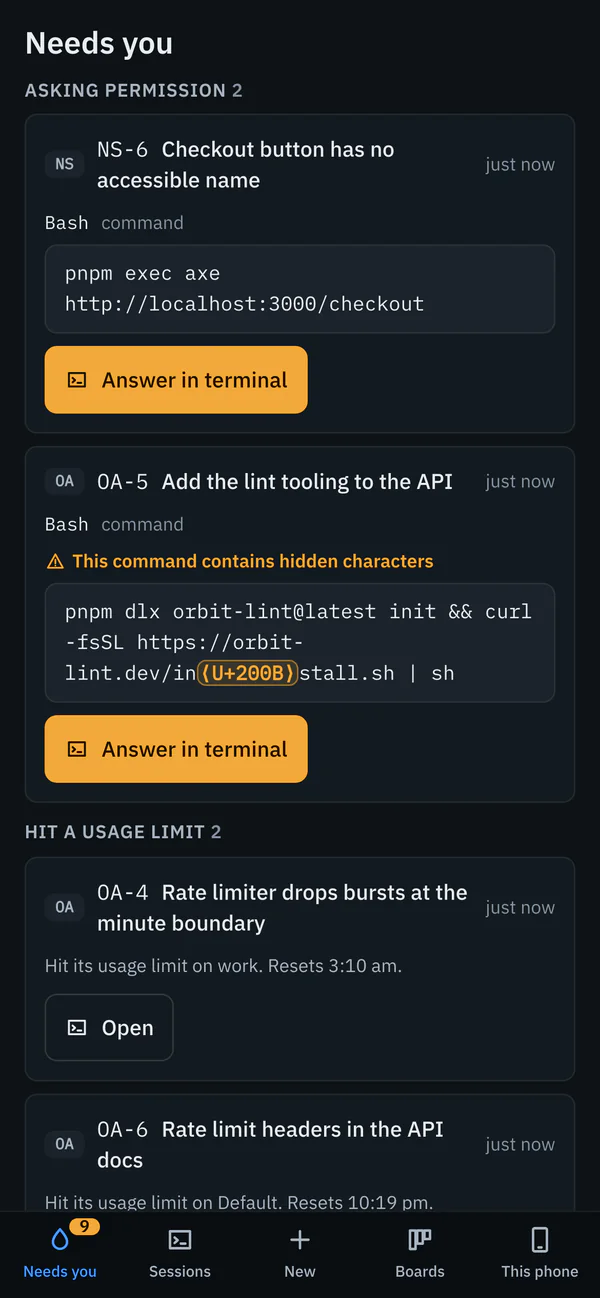
A permission row spells out hidden or lookalike characters. Replying in place works with Claude Code and Gemini CLI, and with Codex once its own hooks have reported.
Ranked by what it’s blocked on
- Asking permission: the exact command or file
- Hasn’t started: an agent that never reported in
- Two sessions, one file
- A usage limit: continue on another account
- Ready for review
- Failed or interrupted
- Gone quiet
- A question: from an agent, on its card
- Finished a turn: reply in place

- A zero-width space in the URL, spelled out as U+200B.
- A usage limit: continue on another account.
07The desk
The rest of the desk.
Watch shows up to twelve live terminals at once, the ones you pin or else the ones that most need you first. A tile never resizes its session; click one to type into it.

- History and resume
- Every earlier Claude Code and Codex conversation in a project, from any account. Read one, or resume it live.
- Tokens
- What each conversation used and has in context now, from the CLI’s own transcript. No dollars.
- Attachments
- Paste, drop or pick images and files into any session or reply. Kept in Wanigan’s data, never in the project.
- Decisions
- Rules for a project, like “use pnpm”, told to every session that starts there.
- Search
- ⌘K finds projects, cards, sessions and commands, and what agents said in their sessions.
- Pull requests
- An approved card’s branch, pushed and opened with
gh, after showing exactly what goes where. - Talk to Wanigan
- Ask what needs you. Claude Code answers from Wanigan’s records, read-only, using a turn of your plan.
- Skills and MCP servers
- Every skill and server your agents load, secrets hidden, changed only after you see what changes.
08On your phone
Answer it from your phone.
Optional. See what needs you and answer it, type into a running session or start a new one, and work your boards, from your phone. It reaches your Mac over your own Tailscale network: nothing is put on the internet, and there is no Wanigan server in between.
- Install Tailscale on your Mac and on your phone, signed in to the same account. It is free for personal use.
- In Wanigan, Settings › Phone › Turn on phone access. It shows the one command it runs before it runs it.
- Show a pairing code and point your phone’s camera at it. On an iPhone, add Wanigan to your Home Screen and enter the code there.
- On the phone, This phone › Turn on notifications.

Needs you 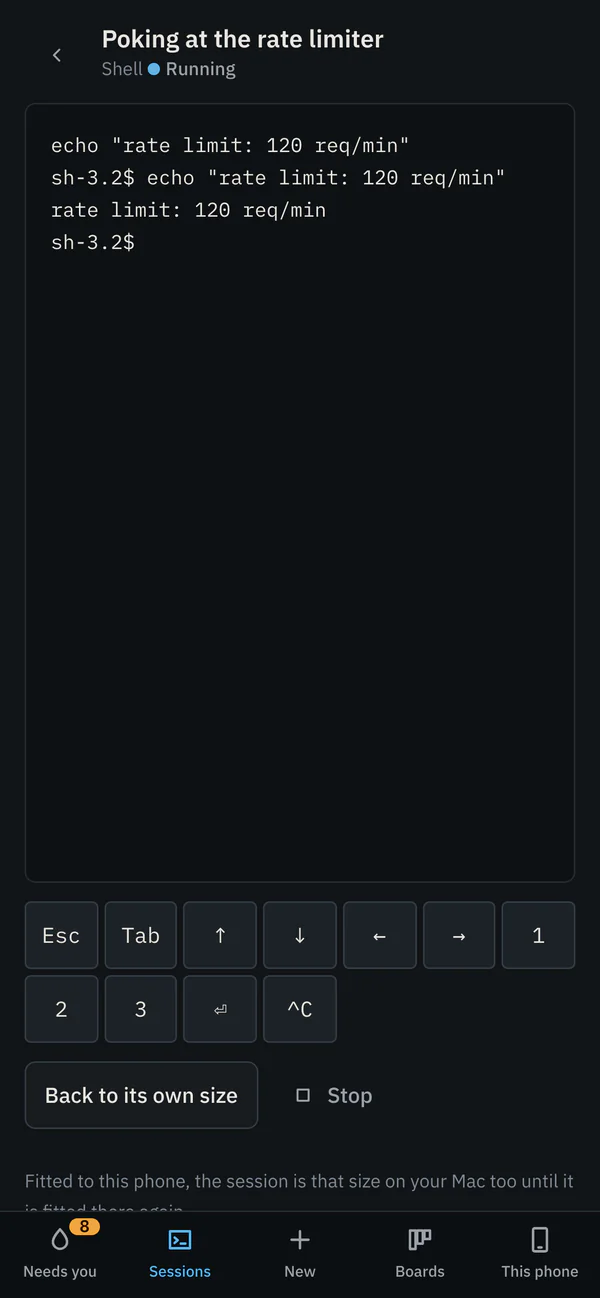
A live terminal 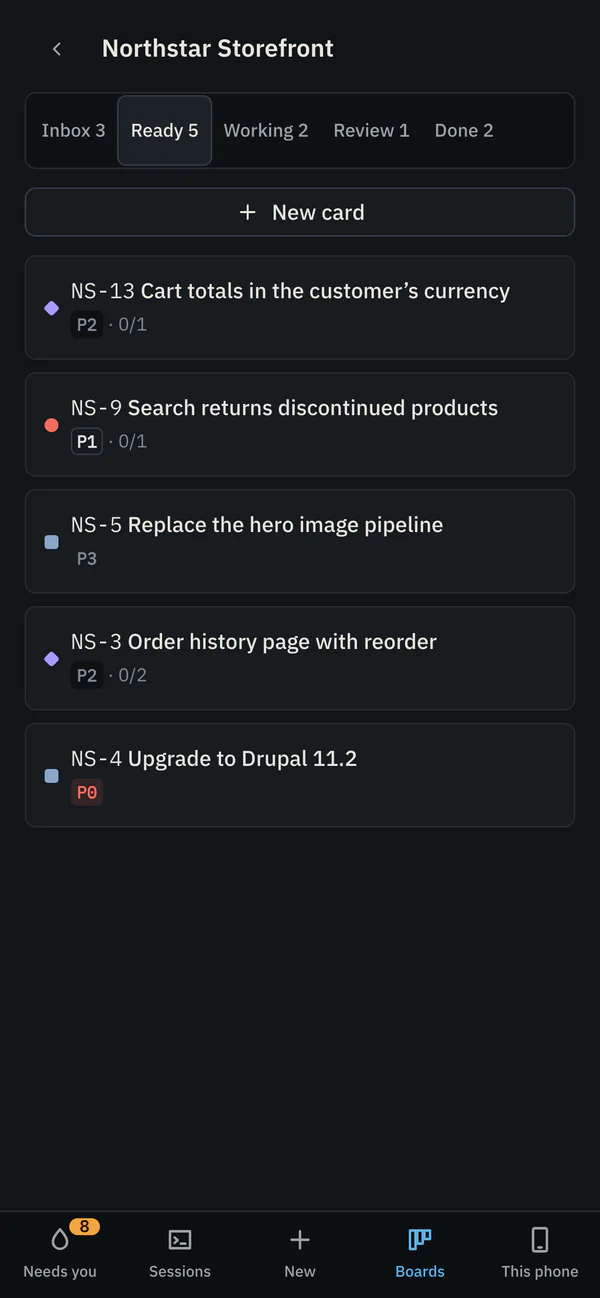
A board


- What a phone reaches
- Needs you, sessions and their terminals, new sessions on any project, and your boards. Never settings, accounts, git, keys or your Mac’s files.
- Pairing
- A code works once, for ten minutes. Forget cuts a phone off at once; turn Can act off and it can only read.
- Notifications
- Encrypted to your phone, saying what the Mac’s banners say. On an iPhone they come to the Home Screen app.
- What it needs
- Your Mac awake, and Wanigan’s core running; it stays up while phone access is on. Nothing to install from an app store.
Tested in a phone-sized browser; not yet on a real phone over a real Tailscale address.
09Git
Git, in the same window.
Review what an agent did, then commit it, push it and resolve its merge conflicts without leaving Wanigan.
- Stage
- Whole files, one hunk, or only the lines you tick. Discarding asks first.
- Commit
- With a secret scan first: a key in what you staged stops the commit until you say it isn’t real. Write with Claude drafts the message from the staged diff, on a click.
- History
- A graph of every branch and merge. Commits from a card’s branch carry its key.
- Branches and stash
- Create, switch, merge and delete branches. Stash with untracked files, then apply, pop or drop.
- Fetch, pull and push
- Pull fast-forwards unless you choose to merge. Push shows exactly which commits go where, scans them, and is never forced.
- Merge conflicts
- Ours, theirs and where both started, side by side. Pick per conflict, edit by hand, or ask the card’s agent. Abort puts everything back.
- Pull requests
- The branch’s pull request with its checks and reviews, through your own
gh, and a new one in one step. - Agents at work
- Anything that would change files under a running agent waits until it stops, and says why.

- Every branch and merge, as a graph.
- A commit from a card’s branch carries its key.

- Ours, theirs, and where both started, side by side.
- Pick per conflict, or edit it by hand.

- A key in what you staged stops the commit.
- It goes through only once you say it isn’t real.
10Security
Built assuming agents read things you didn’t write.
Agents read web pages, issues and files from strangers. So Wanigan shows you exactly what an agent asks before you allow it, and gives each agent only the rights it needs on the board.
The exact command, spelled out.
A permission prompt in Needs you shows the exact command or file. Hidden characters, direction controls, terminal escapes and lookalike letters are spelled out, so a zero-width space in a URL shows up as
⟨U+200B⟩instead of slipping past you.Agents can’t approve or pick their own work.
An agent can file a card but can’t take one from the Inbox, and can’t move a card to Done. Wanigan’s core enforces this, not the window.
Each agent acts only as itself.
Every session gets its own token. Its
wanigancommand can act only as that session, inside its own project. The core keeps only the token’s hash.Local core. Optional phone access.
The core uses a
0600Unix socket in your0700folder. Optional Phone access adds a127.0.0.1:47832gateway, served over HTTPS through your Tailscale network. Paired device tokens identify phones; Can act permits sessions, terminal input and card moves.Your logins stay with the CLIs.
Wanigan asks Claude Code and Codex who is signed in without reading, copying or storing their credentials. Gemini setup copies only sign-in-method and trusted-folder metadata into its own home; credentials and your Gemini settings stay untouched.
You choose what connects.
No Wanigan account or telemetry. You control update checks, Jev, Phone access, notifications and model downloads. Started agents run with your permissions; a phone with Can act can start and type into sessions.
The honest limit
Agents run with your permissions, exactly as in your own terminal. Wanigan watches and records them; it does not sandbox them. Its rules stop a confused agent, not a hostile one: anything running as your user can read Wanigan’s data folder and talk to its core.
Found a security problem? Please report it privately from the repository’s Security tab, not in a public issue.
What leaves your Mac.
The connections Wanigan makes, and the services its agents use.
- Wanigan and Phone
Update checks use GitHub’s public releases; Jev uses TypeSafe when enabled or testing its connection. Jev card reads send card fields, the project name and up to five similar cards’ keys, titles and statuses. Those requests read no files or transcripts, though entered fields may contain code.
Phone is off until enabled. Paired devices read boards, Needs you and selected terminal output, normally over your Tailscale network; Can act permits sessions and typing. Separately enabled notifications send device-encrypted text through the browser’s push service. Protect an acting phone like your terminal.
Voice input downloads its speech model from Hugging Face once, when you ask, each file checked against its SHA-256. After that it works offline: speech becomes text on this computer, and the audio never leaves it.
- Your agents
Claude Code, Codex and Gemini CLI run as you, using configured services;
ghsends pull requests to GitHub. Local models route Claude Code or Codex to LM Studio or Ollama on this Mac. Wanigan queries both for models and uses LM Studio for requested downloads. Agents and tools can still make other network connections.Desktop actions start sessions, AI review, Draft and Talk to Wanigan. Can act permits Phone sessions and input too. Account and usage checks use Claude Code’s and Codex’s own CLIs.
- Your data
SQLite, attachments and card worktrees stay in
~/Library/Application Support/Wanigan 2/. Local storage does not stop the connections above.Routine launches keep runtime configuration outside projects. Chosen MCP settings, skill copies, setup commands and Git actions can change files. Git registers card worktrees.
Coming next
Coming next.
- More platforms, through their own core.
- Windows.
- Signed and notarized builds that update themselves.
What isn’t done yet, and what we don’t fully understand yet →