
Sites
Drupal
In short
Wanigan shows your local Drupal site, names every part of each page, and saves your changes through Drupal’s own APIs, as you, with a revision where Drupal keeps one. This page lists everything it covers on Drupal, what each save goes through, and what it refuses and why.
On this page
What it covers
A Drupal page is built from many pieces: templates, fields of a piece of content, blocks placed in regions, views, menus, Layout Builder sections, components. To change one word you first have to find which of them holds it, and then the right form to change it in. Wanigan finds that for you and saves through Drupal itself.
| Without the helper | With the helper | |
|---|---|---|
| Finding the site | From .ddev, .lando.yml or a dev script in the project | The same |
| Naming the parts | Templates and components, from Twig debug’s own comments while Twig debug is on | Every template, component, piece of content, field, block, view and menu, read through core’s own render |
| Why a part looks as it does | Its template file, and whose code that is | Its suggestions, preprocess steps and hooks, timed, its variables (secrets hidden), cache metadata and queries |
| Saving changes | No | Words through Make it real; any part through Drupal’s own form for it |
| Moves and Take out | No | Where Drupal itself keeps an order, each with Undo |
| Component library | No | Single-directory components and the block library’s blocks, pictured |
| Go to, and content changes | Pages the view has seen; reloads when files change | Every admin page, content, term, user and media item; reloads when content changes too |
The helper names no module. Anything built on Drupal core’s render pipeline, theme system, entities, fields, forms and configuration shows up through it, and a few modules that keep words where core’s saves cannot reach get an adapter.
Try it on Northstar
Northstar, the Drupal demo, is a made-up outdoor-goods shop on Drupal core. These three steps show the helper, a save and a refusal. The full how-to is in the site helper and Make real.
Install the helper
Open a product, such as the Lakeside Enamel Mug. Under Layers, choose Set up the Drupal helper…, read what it writes and runs, and press Install the helper. It runs four ddev commands, which can take a minute, then reloads the page with every part named.
Northstar’s Lakeside Enamel Mug page just after the Drupal helper is installed: the Layers tree naming the product, its fields and the components that render them. Current beta · demo 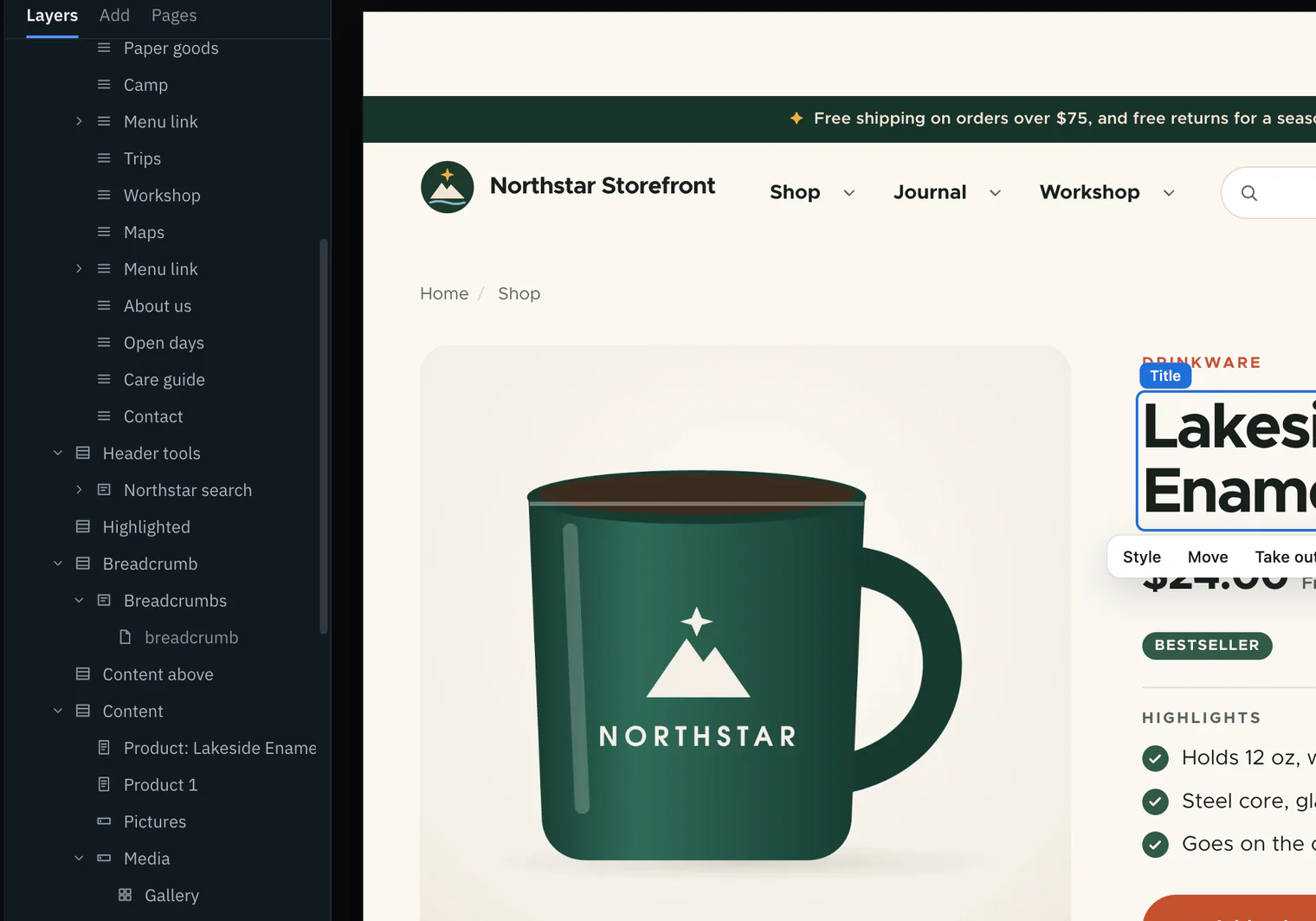
Retype the title and make it real
Select the product’s title (P), press E, type new words and press Enter. Open Edits (On a Mac, ⇧E; on Windows and Linux, Shift+E) and choose Make it real. The words are saved to the title of that product, in that language, as a new revision by you, and the edit becomes In the site, not verified until you run Verify.
Edits after Make it real on the Lakeside Enamel Mug’s retyped title: the message “Saved … in the site, as revision …”, the edit In the site, not verified, and Verify. Current beta · demo 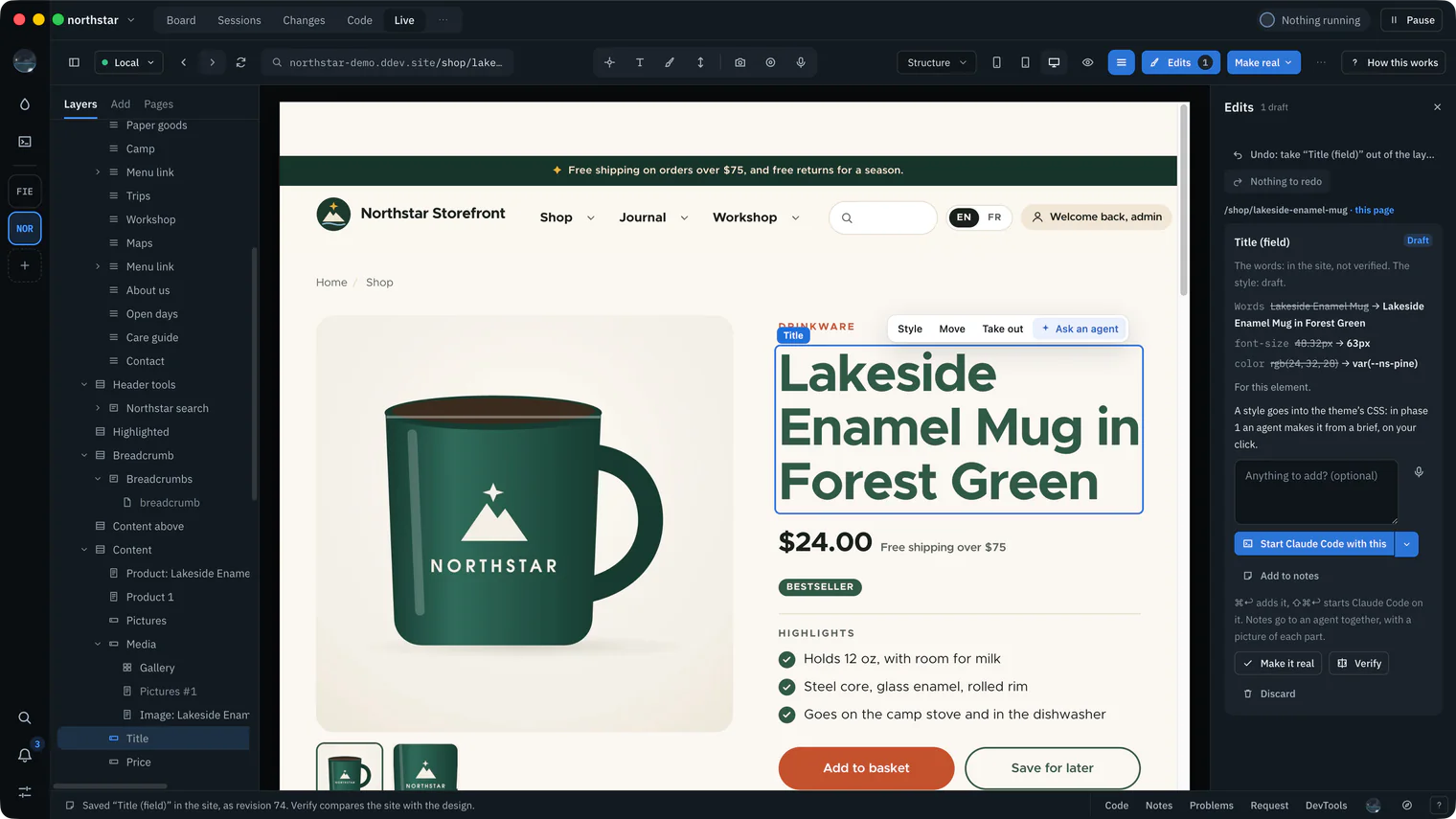
Try a page with a draft waiting
The Ember Camp Mug has a newer draft waiting over the version visitors see. Retype its title the same way and choose Make it real: nothing is saved, and the edit says “This content has a newer draft than the version the page shows, and Wanigan does not save into a draft yet”, with Tell an agent… under it. Saving would leave the draft behind, so change it in Drupal’s form, which edits the draft.
Edits on the Ember Camp Mug page: the title edit still a draft, the answer saying the product has a newer draft and Wanigan does not save into a draft yet, and Tell an agent… under it. Picture to come Picture: to come
A screenshot of the real app, with the demo’s data, of what the title above says.


Finding the site
Wanigan reads the project’s own files and offers the address they name: a ddev project from .ddev/config.yaml, a Lando site from .lando.yml, or a dev script from package.json. It starts nothing to find them. Details are in Turning it on.
- For a ddev site, Wanigan asks ddev whether the site is running, and Start it runs
ddev starton your click. A Lando site or a dev script that does not answer is named, with how it is started; Wanigan does not start those. - The helper installs with ddev only. In a project with no
.ddevfolder Wanigan does not install it yet; the page is still shown, and Twig debug still names its templates.
Without the helper: Twig debug
Twig is the language Drupal’s templates are written in. When Twig debug is on, Drupal writes a comment around every template’s output saying which file printed it and which other file names it could have used. Switch it on in Configuration › Development › Development settings.
From those comments alone, Layers names each template and single-directory component, nested as the page nests them, and says whose code each file is from where it sits: core, contributed, or yours. A single-directory component is one whose template, styles and .component.yml (its props and slots) live in one folder.
With Twig debug off and no helper, Layers says “Nothing on this page says what made it”. You can still select a part and point an agent at it.
The helper module
The Drupal helper is a development-only module, wanigan_live, that Wanigan writes into the site’s modules/custom folder on your click and installs with ddev drush. A module is a package of code that adds to Drupal; this one adds nothing a visitor can see.
- It switches on Twig development mode (debug on, Twig and render caching off) and keeps the settings it found in Drupal’s state, so removing the helper puts them back. Pages are slower meanwhile, as they are when you switch it on yourself.
- It acts only for requests that carry the token Wanigan keeps in Drupal’s state, which only the live view sends. Every other request gets exactly what core makes, so the site looks the same in any other browser.
- Its folder is listed in the repository’s
.git/info/exclude, so git never sees it and it cannot be committed. - It carries a version (4 in this build). When the one in the site is older than your Wanigan’s, Wanigan says so and offers Update the helper…, which rewrites only its own folder.
What it adds, in the words of its install dialog:
- What made every part of the page, read through Drupal core: its template and the suggestions it could have used, the preprocess and alter hooks that shaped it (each with its time and what it changed), its variables, cache tags and queries.
- Edits any field where it shows, in Drupal’s own form for that one field, saved as a new revision by the user you are logged in as in the live view.
- Moves blocks between regions, menu links, a field’s items and a display’s fields by dragging, through core, each with Undo, and says first when a move changes configuration every page shares.
- Copies a template into your theme to override it, only when you ask.
- Go to: admin pages and their tabs, content, terms, users and media.
- One piece shown alone: a piece of content, a component with its examples, a block, or sample content where there is none yet.
- Reloads the view when content changes in Drupal (an agent running drush, an editor saving), not only when files change.
How to install, update and remove it, and what happens when another Wanigan set it up, is in Turning it on.
Naming parts
With the helper, each part is named the way the site names it: a piece of content as “Product: Lakeside Enamel Mug”, a field by its label, a block, a region, a view or a menu by its name, a component by its .component.yml name. A template nothing else names keeps its file name. See the Inspector for how Layers shows them.
Each part also says what the site stores it as, so an edit finds it again after a reload or a reorder: an entity (Drupal’s word for a stored thing, such as a piece of content, a term or a user), a field and its item (a reference by what it points to, so a reorder does not lose it), a component inside a part, a block placement, a menu or menu link, a view, and a Layout Builder component by its id on the content it is shown for. A paragraph is named as itself, with the revision the page showed.
On Northstar, 318 of 394 parts were named this way, and a moved menu link kept its name as it moved.
What Make real saves
Make it real saves the words you typed on the page into the one thing that holds exactly those words. On Drupal that is one of these, chosen from what the helper says made the part:
| Words in… | Saved through | Checks and revisions |
|---|---|---|
A plain text field (string, string_long) | The Entity API: the translation the page showed, and the one item of the field holding the old words | A new revision by you; validated as Drupal’s own form for that field would, with the workflow; refused over a newer draft |
Formatted text (text, text_long, text_with_summary) | One run of words spliced into the stored text, its markup kept byte for byte | Saved only when the field’s own text format shows nothing else changed |
| A field’s label | The field’s own configuration save | Required, at most 255 characters |
| A block’s title | The block placement’s configuration | Required; your user needs the permission its form needs |
| The site’s name and slogan, where core’s branding block shows them | The site’s configuration | Name required; slogan at most 255 characters |
| A view’s header, footer or empty text | The view display that owns it, one run of words at a time, so its markup never enters the value | Refused while Views UI holds the view locked |
| A content menu link’s text | Its title field, through the field save | The same checks as a field |
| A Layout Builder inline block | Its layout, as Layout Builder’s own block form saves it | A page’s own layout as a new revision; a default layout says how far it reaches first |
| A paragraph (the Paragraphs module) | The page that holds it, as a new revision, through the Paragraphs adapter | The page’s workflow, log and checks |
| A form’s words (the Webform module) | Webform’s own API, through the Webform adapter | In the form’s language or its translation; shared words say how many forms first |
| Any other field of the content the page showed | The stored-words search, through the Entity API | Found exactly once, as words; a new revision |
Configuration
A field’s label, a block’s title, the site’s name and slogan, a view’s words and a webform are configuration: Drupal’s settings, kept in the database and usually exported to files in the code. The next configuration import puts back what is exported, so every such save says so. Export the configuration to keep the change.
Words the page shows in another language are saved to that language’s configuration translation, which needs the “translate configuration” permission. Words with no translation are never saved to another language.
A new address
Every save answers with the content’s address before and after. When a new title gives the page a new address, as it does on a site where the Pathauto module makes addresses from titles, the view goes to the new address instead of reloading the old one.
Words shown beyond this page
A Layout Builder default layout, which every page of a kind without its own layout shows, a Paragraphs Library item and a webform’s shared words say how far they reach before anything is saved. Make it real again to save them. More in Make real.
Edits through Drupal’s own forms
For a change that is more than words, choose Edit ▾ on a part. Under In the site · saved by Drupal as you, each way to change it opens beside the part: Drupal’s own form, saying “Drupal’s own form, saved by Drupal as you, as a new revision.” where the content keeps revisions, or for a single value, such as a block’s title, a short form Wanigan draws that Drupal checks when you save. Saving reloads the page.
| A part that is… | Opens |
|---|---|
| A field of a piece of content | The content’s own form, narrowed to that one field and its widget. The whole content is validated as core does; it saves a new revision, and edits the newest version, so a draft is never written over. |
| A block placement | The block’s own form |
| Another configuration item, such as a view or a menu | Its own edit page |
| A menu link | A content menu link’s form; any other link where its module defines it |
| Something Layout Builder lays out | Layout Builder’s own page for that content |
| A template from core or a contributed module | Create override…: the template copied into your theme, on your word only. Refused when a file of that name is already in the theme, when the active theme is core’s or contributed, or without “administer themes”. |
| A component | Its props, with where they are written: the field that stores them, or the Twig code to override. Never saved from here. |
Where a part cannot be changed here, the menu says why: your user may not, the field is computed or read only, no widget edits its type, or the content belongs to other content or is shown as one pinned revision of it.
Before you save, the sheet says whose code also runs on that save: the modules that implement the entity’s save hooks, or listen to a configuration save. Drupal core has no AI API, so Wanigan cannot list a Drupal site’s AI, and says so in the Inspector’s AI on this site.
Moves, inserts and Take out
Drag a part by its handle, or press M on a chosen part, to move it where Drupal itself keeps an order. Each move first checks the order is still what the page showed, and answers with the order as it is now when it is not.
| What moves | What the move saves |
|---|---|
| A field’s items | The field’s values in the new order, as a new revision. Refused when the page shows a different number of items than the field holds. |
| A theme region’s blocks | Each block placement’s region and weight. A block can move into an empty region. |
| A menu level | Each link’s weight and parent, as the menu’s own form saves them. Links move between levels of one menu. |
| The fields of a display | The display’s weights. Refused when Layout Builder arranges the display, or its template prints the fields one by one. |
| Layout Builder regions | The layout, as Layout Builder’s own move saves it. Refused while Layout Builder holds unsaved changes. |
Inserts add a block from the block library to a region, placed as the block form places one, or a new item to a field whose type can make a sample value. A new reference is never inserted, since it would create content of another kind, and a component is never inserted: core has no place that stores one.
Take out (On a Mac, ⇧X; on Windows and Linux, Shift+X) takes only the placement or reference away, never what it showed:
- A block placement is switched off, not deleted, and stays in Block layout with its settings.
- A menu link is switched off in the menu, not deleted.
- A field item’s reference goes, and the content, media or file it pointed to stays. A Layout Builder component goes from the layout, and what it showed stays.
- Refused where core would delete what the part showed: an inline block in a layout without revisions, or a file, image or other owned reference on content that keeps no revisions. A link with links under it is refused too.
- Anything shared says where it shows and asks first. Taking something out of configuration says to export the configuration to keep it in code.
Undo puts a move or a removal back for ten minutes, and only while nothing else has changed what it touched.
The component library
The library (On a Mac, ⇧B; on Windows and Linux, Shift+B) lists what the site can place, as Drupal core lists it: its single-directory components and the blocks its block library offers. Each is pictured alone in the site’s own theme at a phone’s and a desktop’s width, with its props, slots and files.
- Where it is used across the site: its placements in every theme, Layout Builder default and per-page layouts, and for a component the templates that include it, found by Drupal’s own Twig parser. It says what no search of stored data can see.
- A component cannot be placed on a page by itself through core: Drupal keeps no such thing outside a template or a field, and the library says so. Blocks can be placed from it.
- Seen in the real app on Northstar: 73 entries, pictured at exact sizes.
How the library looks and works is in Components.
Canvas
Canvas is a contributed page builder for Drupal that keeps a page’s design in its own component tree. In this build, Canvas pieces by their own ids are on the list of what is not built yet.
The stored-words search leaves a Canvas component tree’s inputs out, so it never writes into one. Words a Canvas page keeps there are not saved from here: change them in Canvas, or tell an agent from Edits.
What is refused, and why
Every refusal says why, and which kind of why. Drupal keeps no such thing means core stores those words nowhere it can write, so they are code: an agent or you change the code. Wanigan does not do it yet means core could save it and Wanigan does not, from here; change it in Drupal’s own form meanwhile.
| Words in… | What to do |
|---|---|
| Words typed into a Twig template | An agent changes the template from a brief, in a copy in your theme when the template is not yours |
A menu link a module writes in its links.menu.yml file | Change it where it is defined |
| The label of a base field (one a kind of content defines in code, such as a title) | Change the code |
| A component’s props written in Twig | Copy that template into your theme and change it there |
| Words a Webform token or computed element makes | Change what makes them |
| Words in… | What to do |
|---|---|
Words a template prints through t() (an interface translation: Drupal’s translations of the words code prints) | Change them under Interface translation, or in the template. A change there reaches every page that prints the same words. |
| An image’s caption, words across formatting, or words a media item embedded in the text shows | Drupal’s form, or the media item |
| Content with a newer draft, or a page that shows a draft | Drupal’s form, which edits the draft |
| A language the content has no translation in yet | Translate it in Drupal first |
| A field of a type Wanigan’s word saves do not model | The stored-words search tries it first; otherwise Drupal’s form |
| Words a formatter Wanigan does not know shows, or a trimmed summary | Drupal’s form, or where the whole text shows |
| A paragraph inside a Layout Builder inline block | Layout Builder |
| A webform’s shared options in a translation, or a wizard page’s own button label | Webform’s form |
Other refusals are about now: the content changed since the page loaded, several things hold the same words (each named), your user may not change it, or Drupal refused, in its own words. Reload and try again. More in Make real.
In depth
How the trace hooks core
The trace runs only for a main page request carrying the token. For that request, five of core’s own services run as subclasses of their core classes; each is swapped in only when the running core’s class has exactly the methods and signatures it was written against. For every other request each method calls core’s and returns its answer untouched, so the page is byte for byte what core makes.
| What | Where in core it is read |
|---|---|
| Every template’s output becomes a part | Where a template’s final variables, file and output meet: the Twig engine (11.3 and later) or the theme manager (before). Each part is wrapped in wl:part comments outside core’s own debug comments. |
| What shaped a template | Each preprocess step, run exactly as core runs it, timed, with the variables it changed |
| Suggestions | The file names core offered, most specific first, which exist in the theme, and which was chosen |
| Hooks | Every module’s and theme’s implementation, timed, in core’s own order |
| Cache and cost | Each element’s cache metadata and libraries, and whether a normal request would be served it from the render cache |
| Queries and logs | Each query’s SQL (never its values), time and caller, and the log entries of the request |
Variables are those the template received, each with its type and a preview of at most 400 characters. Anything named like a key, token, password, secret, hash, salt, nonce, session or cookie, a form’s token or build id, a long run of token characters, or a password hash is hidden as [redacted].
- A traced render reads and writes no render cache: a hit would skip what made the part, and a write would store marks for others.
- Placeholders and BigPipe’s streamed parts are rendered into the page for a traced request, so nothing arrives after the trace is stored. Other requests stream as before.
- Single-directory components are marked from a Twig extension that runs after core’s own, whether they are placed from a render element or from Twig code.
- The helper keeps the last 20 traces per user for ten minutes.
Drupal versions
The helper declares core_version_requirement: ^10.3 || ^11: any Drupal 10 from 10.3, and any Drupal 11.
Core’s classes changed shape between 10.3 and 11.4, so the trace has one class for each shape a service has taken, and puts in place the one whose signatures are exactly the running core’s, loading none to decide. When none fits, as on a release the helper does not know, core keeps its own class and the parts are found through hooks every release has.
Found through hooks, a template and its wrappers are one part, the preprocess steps are not listed, a part’s cache metadata is its own, and hooks are not timed where the module handler or theme manager is not one the helper knows. The trace’s log says so.
Every release from 10.3 to 11.4 is checked against stand-ins built from that release’s own signatures, and a page traces alike on each shape. Every file of the helper parses under PHP 8.1, Drupal 10.3’s minimum. It has not yet been seen on a real 10.x site, or on 11.0 to 11.3.
The rules a field save follows
- The words go to the translation the page rendered and to the one item of the field holding the old words. Two items holding them are refused, never guessed between.
- Only over what the page showed: the revision, or where the content keeps none its changed time, or else a hash of the words as rendered. Content saved since is refused.
- Validated as Drupal’s own form for that one field would, plus the workflow’s check that you may make this change, before and after the change. A save keeps the content’s state; nothing is made a draft instead. An old problem in a field the change does not touch is noted, not refused.
- Where the page shows more around a field’s words than the field holds (a symbol and a year added by a template, say), only the field’s own words are changed, and a change to what is added is refused as code.
- Formatted text is changed one run of words in one stored text node, and kept only when rendering the old and new text through the item’s own format differs in those words alone. Words a filter makes and a format your user may not use are refused.
Not checked yet: what CKEditor 5, Drupal’s text editor, does to a stored text the next time it opens it.
The stored-words search on Drupal
When nothing the page offers holds the words and no template writes them, Make it real asks the helper where the content the page showed keeps them. It searches every field of that translation its other saves do not already cover: each item’s stored strings (plain words, markup, JSON read token by token, a saved list) and maps. Only the version visitors see is searched.
Never searched: references, files, numbers, dates, choices, addresses, paths and computed fields, values a contributed module keeps in its own shape (SEO tags and analyses, a view reference’s arguments, a webform’s elements, a pattern’s source, a page builder’s component tree), a paragraph’s own settings, and machine names.
It saves through the Entity API with the same gates as a field save, as a new revision with a log message, and checks just before writing that the value is still what it found. A paragraph found this way is refused: it is saved through the page that holds it instead. Undo puts the old value back as a new revision for ten minutes, while the value is still what was written.
How the search matches words is in Make real.
What has been seen
| Where | What |
|---|---|
| In the real app on Northstar, driven by a script | A product title made real and verified; moves; a block placement taken out after its question and put back with Undo; a link with links under it refused; the component library and its pictures; part identity; a helper another Wanigan set up |
| By hand on real local sites | Installing, using and removing the helper; the trace; a field saved through its own form and put back; a block’s and a menu link’s forms; a template copied into a theme; a block and a menu link moved, a stale move refused, each undone; Go to |
| With stand-ins only | Formatted text; configuration words; a menu link’s text; Layout Builder inline blocks and default layouts; paragraphs; Webform; words a template writes; the stored-words search |