
Agents and the board
Review with evidence, checkpoints and undo
In short
A card reaches Review only with evidence, and only you approve it into Done. Wanigan shows what each turn changed, can ask Claude Code to check the work against every criterion, and can undo an agent’s last turn on a card’s own branch.
On this page
Done means checked
An agent saying “done” is not proof. On Wanigan’s board a card moves to Review only with evidence, a file, a link or a note that shows the work, and only you move it on. An agent can never mark its own work done.
- An agent submits with
wanigan review NS-7 --evidence test-output.txt --note "fixed; tests pass". A submission with no evidence is refused. - A card in Review waits in Needs you, under Ready for review, until you approve it or send it back.
- Everything that happens to a card, and who did it, is in the card’s History and in the project’s Activity.
Review a card
Open it
Click Review on its row in Needs you, or the card in the Review column. It opens in the drawer beside the board, on Overview: the criteria, the description, Jev’s read, and the conversation with its agent.
Read the evidence
The Review tab lists the evidence, each piece with who offered it and when; a file that did not exist when it was offered is flagged. The sessions that worked the card are there with their tokens, and so is the AI review.
NS-7 Free shipping banner over $75 open in the drawer on its Review tab: the AI review, three pieces of evidence (after-axe.txt, a pull request link and a note) and the session that worked it. Current beta · demo 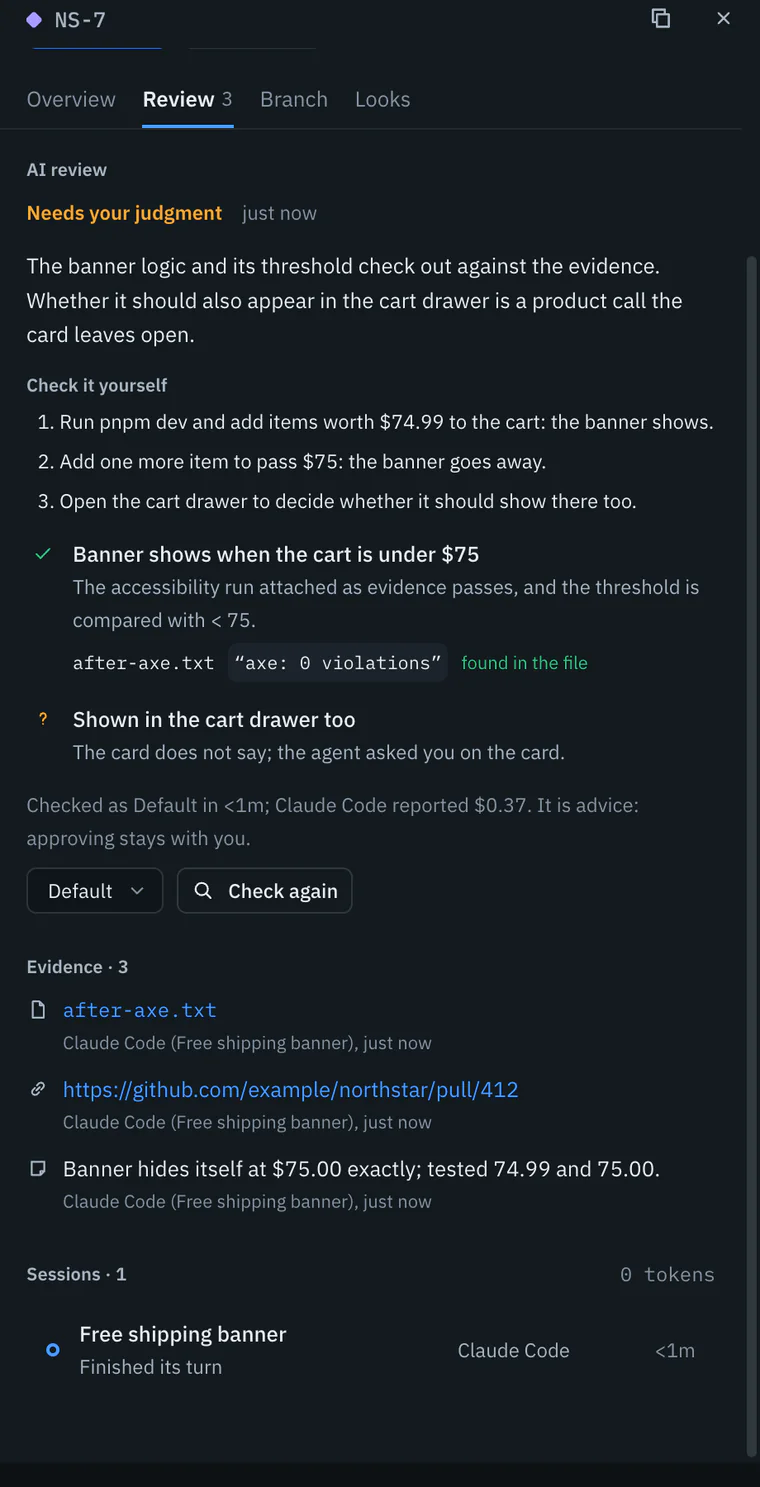
Check it, or ask Claude
Tick each criterion the evidence proves. Ask Claude to check it runs an AI review against every criterion (AI review); it is advice, and the decision stays yours.
Decide
Approve moves it to Done. Send back… asks “What should change?”: the card returns to Ready, flagged, and your note is what its next session is told.
NS-7’s drawer after Send back…: the What should change? box filled in, with Send back and Cancel. Current beta · demo 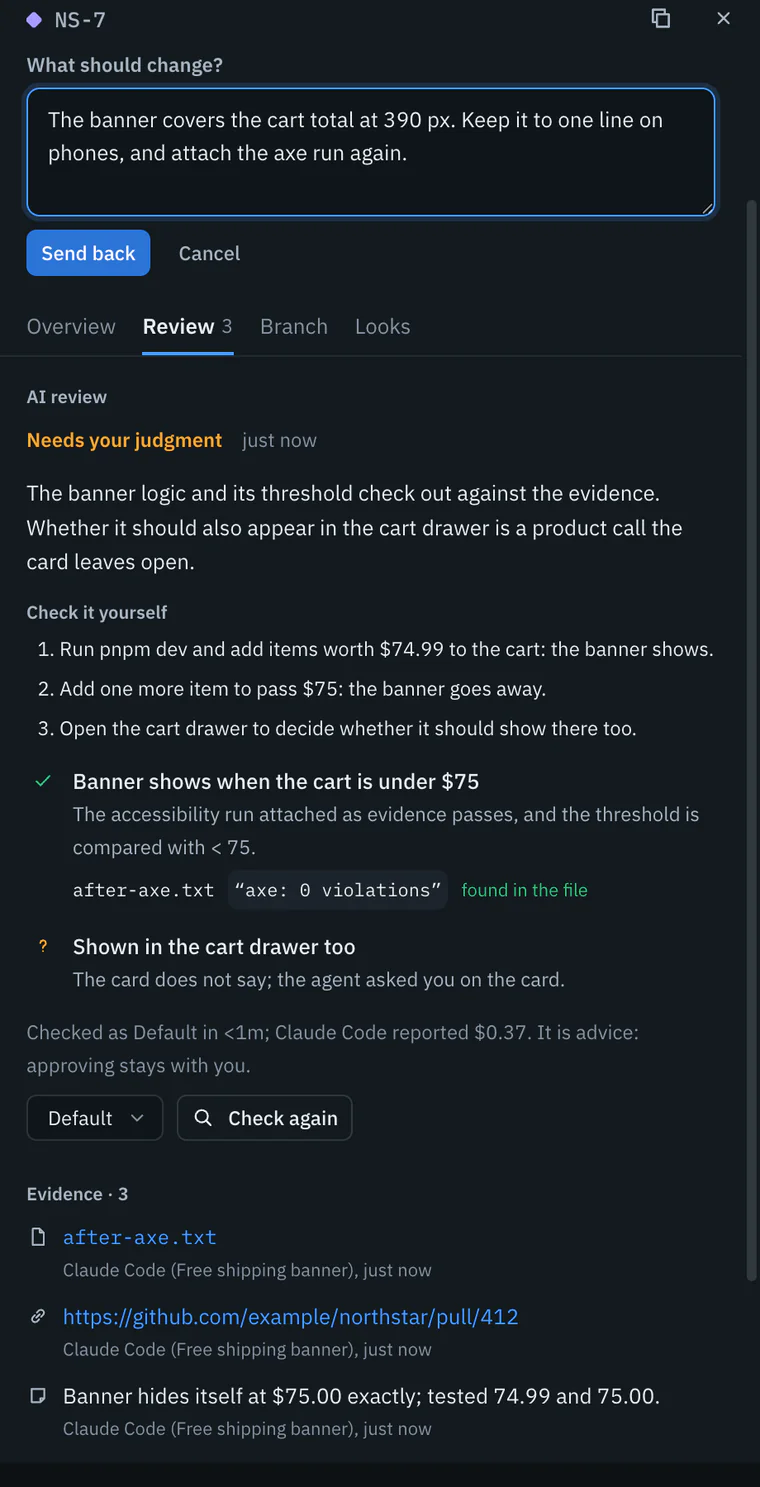


What the drawer shows
| Tab | What it holds |
|---|---|
| Overview | Type and priority, the description, acceptance criteria with their ticks, Jev’s read, the conversation (comments, and questions you answer in place) and the card’s history. |
| Review | The AI review, the evidence, and the sessions that worked the card, with the tokens they used. |
| Branch | Its own branch: what it changed, Merge into its base, Remove branch, and the pull request once it is approved (Git in the app). |
| Looks | Its page before and after, and what its agents looked at in the live view. |
Above the tabs are the card’s stage, and the actions that stage allows:
| Stage | Actions |
|---|---|
| Inbox | Accept to Ready, Start a session, Archive |
| Ready | Start a session, Archive |
| Working | Open terminal, Take back |
| Review | Approve, Send back… |
| Done | Reopen as not fixed…, Archive |
AI review
Reading every file an agent touched takes time. Ask Claude to check it runs Claude Code with read-only tools against each criterion: it reads the code and the evidence, says met, not met or could not tell, and backs each answer with a file and an exact quote. Wanigan then checks every quote against the real file, and shows whether it was found.
| Verdict | Means |
|---|---|
| Looks done | Every criterion met, each with proof. |
| Changes needed | At least one criterion is not met. |
| Needs your judgment | It could not decide: look and feel, product judgment, or proof only running it can give. A “done” whose quote is not in its file, or that skips a criterion, is downgraded to this, and says so. |
It also lists steps under Check it yourself, such as a command to run or a page to open. A review uses a turn of the chosen Claude account’s plan, says what Claude Code reported it cost when it reports one, and never moves the card. On the board, the card then shows AI: looks done, AI: changes, AI: your call or AI: failed.
Send back, reopen, archive
- Send back…, from Review: the card goes to Ready, flagged Sent back, and your note becomes a comment. The agent that submitted it sees the note in
wanigan status, and the next session is told. - Reopen as not fixed…, from Done: say what is still wrong, and it becomes a new acceptance criterion; the card goes to Ready, flagged Reopened.
- Archive takes a card off the board for good. Nothing is deleted, and the List still shows it.
- An agent asked a question? Answer it in the card’s Conversation, which settles it, or with Reply in Needs you, which also sends your answer to the agent.
Before and after
A diff says what changed in the code; it cannot say what the page looks like now. With the live view on, turn on Settings › Live view › Keep before and after screenshots on cards, and it takes a full-page picture of the card’s page as its session begins, and again after each turn that changes files, with what changed marked. The card’s Looks tab shows them Side by side, as a Slider, or as Changes, and Larger opens them big.
Picture: to come
A screenshot of the real app, with the demo’s data, of what the title above says.
They are taken and kept on this Mac, in Wanigan’s data folder: a session’s first before, its last after, and a card’s newest twelve, at 1440 CSS pixels wide. A site that is not running is not photographed, and the card says why a picture is missing. The Looks tab also lists what the card’s agents looked at through the live view’s tools (Build with an agent).
Turns, checkpoints and undo
An agent can change twenty files in a turn and break something on the way. Wanigan checkpoints the folder with git when a session starts and each time a turn ends, without touching your index, branch or stash, so each turn’s changes can be read on their own and the last one undone.
Open the turns
In the session, show the right panel (On a Mac, ⌘⇧D; on Windows and Linux, Ctrl+Shift+D) on Turns. Each turn lists its tools and the files it wrote, and under it what git saw change, such as “3 files +40 −12”.
Read a turn’s changes
Click that line to lay the turn’s diff over the terminal: its files on the left, the chosen file’s diff beside them, and Edit to open a file in the code editor. Esc goes back to the terminal.
A turn’s changes laid over the terminal in the Low-stock badge on product cards session: the turn’s files on the left and LowStockBadge.tsx’s diff beside them, with the line saying undo waits until Claude is idle at its prompt. Current beta · demo 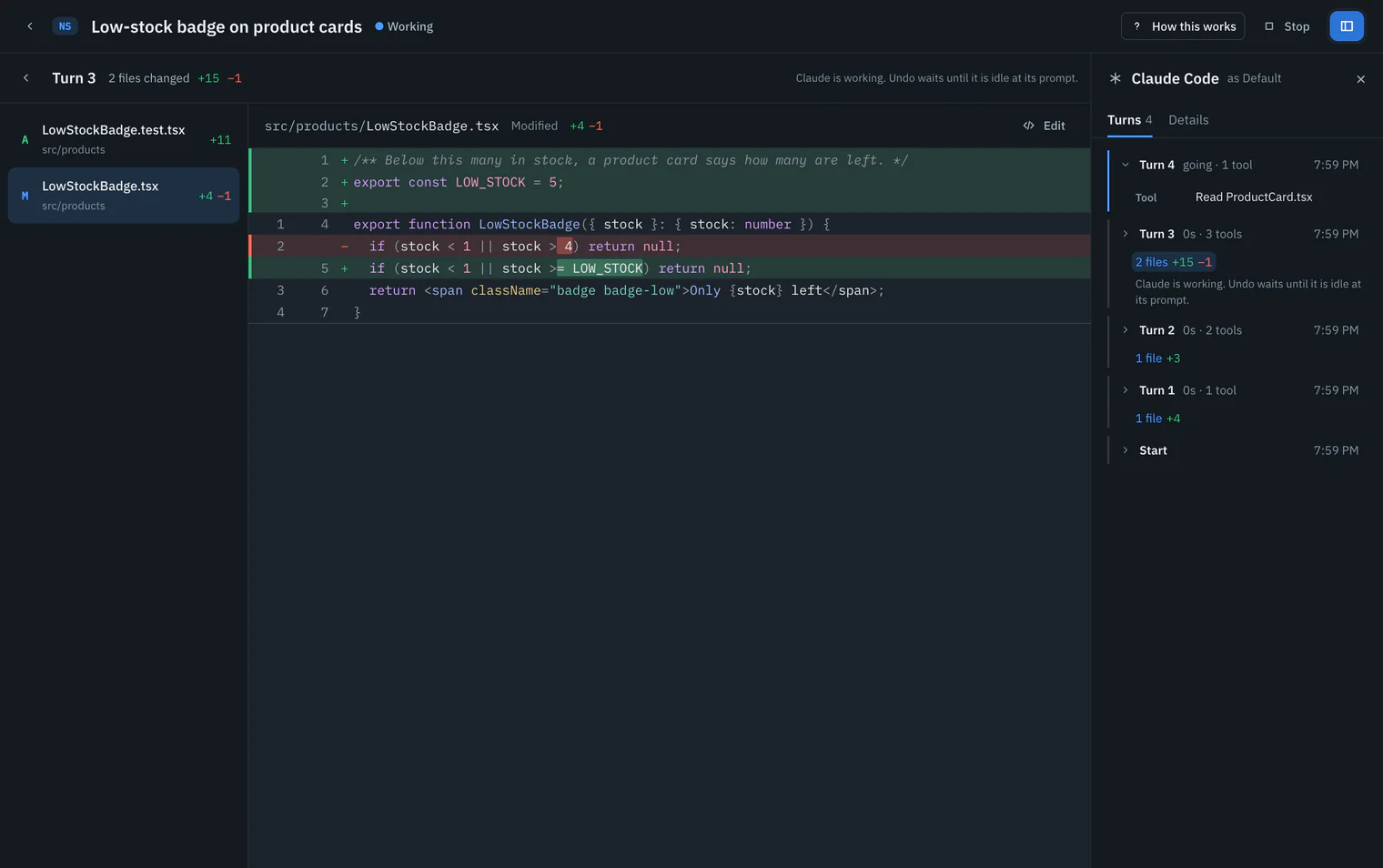
Undo the last turn
On the last turn, Undo this turn lists the files that go back to how they were before it. Confirm, and they do. Redo puts the turn forward again.
The Undo turn dialog for the last turn of a session on a card’s own branch: the files that go back, and the note that nothing is committed, staged or typed into the session. Picture to come Picture: to come
A screenshot of the real app, with the demo’s data, of what the title above says.
Tell the agent
Undo changes files only: nothing is committed, staged, or typed into the session. The agent does not know until you tell it in the composer.

Draft with Claude
A good card takes longer to write than the note in your head. In New card, type a rough note in the title or description and click Draft with Claude. Claude Code reads the project with read-only tools and fills in the type, a clear title, a description that names real files, two to six checkable criteria and a priority, with one sentence on why. Nothing exists until you edit it and click Create card. It uses a turn of your plan.
In depth
How AI review checks itself
- It runs headless as
claude -pwith only the Read, Grep and Glob tools. Editing, shell and web tools are refused, no MCP server from the account is loaded, the account’s own hooks, skills, plugins and settings are asked to stay off, and the run is not saved as a conversation. - It runs in the card’s worktree when it has one, else the project folder, as the account under Account to review with (the project’s Claude account unless you choose another), and stops after 12 minutes.
- A quote is checked in the file it names, which must be inside that folder or be a file the card offers as evidence. Links are not followed, runs of spaces and line breaks count as one space, and a file over 2 MB counts as not found.
- A pass is downgraded when a quote is not in its file, when a criterion is not shown met, or when it checked fewer criteria than the card has.
- One review runs at a time per card. A review cut short by a stop or a core restart is recorded as failed, with the reason.
What a checkpoint holds
- The folder as
git statussees it, tracked and untracked files alike with .gitignore respected, read through a copy of your index so the real one is never written. - It is a commit that no branch points at, kept in Wanigan’s own object store for that repository, in its data folder; nothing is written into the repository’s .git. It carries Wanigan’s name, never yours, and no signature.
- Untracked files over 20 MB are left out and the turn still records. With more than 200 of them, or after 5 seconds, the turn is not captured, and says why; so does a folder that is not a git repository.
- A turn after one that was not captured includes that turn’s changes too, and says so. A turn during which another session ran in the same folder is marked “May include another session’s edits”.
- A turn’s view carries diffs for up to 200 files, up to 200,000 characters each and two million in all; the rest are listed without one. Codex’s turns are checkpointed too; a shell has no turns.
When undo is refused
Undo is refused whenever it could lose or misplace work, and the reason is shown where the button would be:
- The session works in the project folder rather than a card’s worktree, or its folder is gone.
- The agent is working, asking permission or stopped at its limit: undo waits until it is idle at its prompt.
- Another session is running in the same folder.
- The turn, or the turn before it, was not captured, or the turn changed no files.
- The agent made a commit during the turn, or a commit was made since: undo changes files only.
- The folder has changed since the turn ended.
- Going back would delete a file that was there before the turn but that git could not see, or the turn changed .gitignore. Undo that one by hand.
- Git no longer has the checkpoint.
Before undoing, Wanigan checkpoints the folder as it is, so the undo can be redone, then applies the change with git apply, which changes everything or nothing. The undo is recorded in the session’s turns and in Activity.