
Agents and the board
Git in the app
In short
Every project’s Changes view is a git workbench: read every diff an agent made, send it notes on lines, stage and commit what you checked, and push without surprises. A card can work on its own branch, merge back with one button that refuses rather than forces, and become a pull request with your own gh.
On this page
From an edit to a push
Agents change files fast, and nothing should leave your Mac until you have read it. Changes (G then C) puts the whole path in one place: review the diff, choose what goes into each commit, and push when it is right. Wanigan checks for secrets on the way out, and never forces anything.
| Tab | What it is for |
|---|---|
| Changes | The working tree: every changed file’s diff in one scroll, staging, and the commit box. |
| Commits | History as a graph, of this branch or every branch, filtered by message or author, with a commit read in full. |
| Branches | Every local and remote branch and where it stands: switch, merge one in, delete, or make a new one. |
| Stashes | Changes put aside, each read file by file, with Pop, Apply and Drop. |
The toolbar’s checkout menu names the branch and where it stands against its upstream, and moves between The project folder and each card’s worktree.
Review a turn’s diff
Start from the session
In a session’s Turns panel (On a Mac, ⌘⇧D; on Windows and Linux, Ctrl+Shift+D), click the line under a turn, such as “3 files +40 −12”, to see exactly what that turn changed (checkpoints).
Read it all in Changes
For everything not yet committed, open Changes. The left panel lists Conflicted, Staged, Changed and Untracked files, each marked with the session that changed it, and the diffs fill the rest. J and K move between files; V marks one Viewed and folds it away.
Changes in Northstar Storefront’s project folder: the file list with Staged and Changed groups and the commit box, and the diffs in one scroll. Current beta · demo 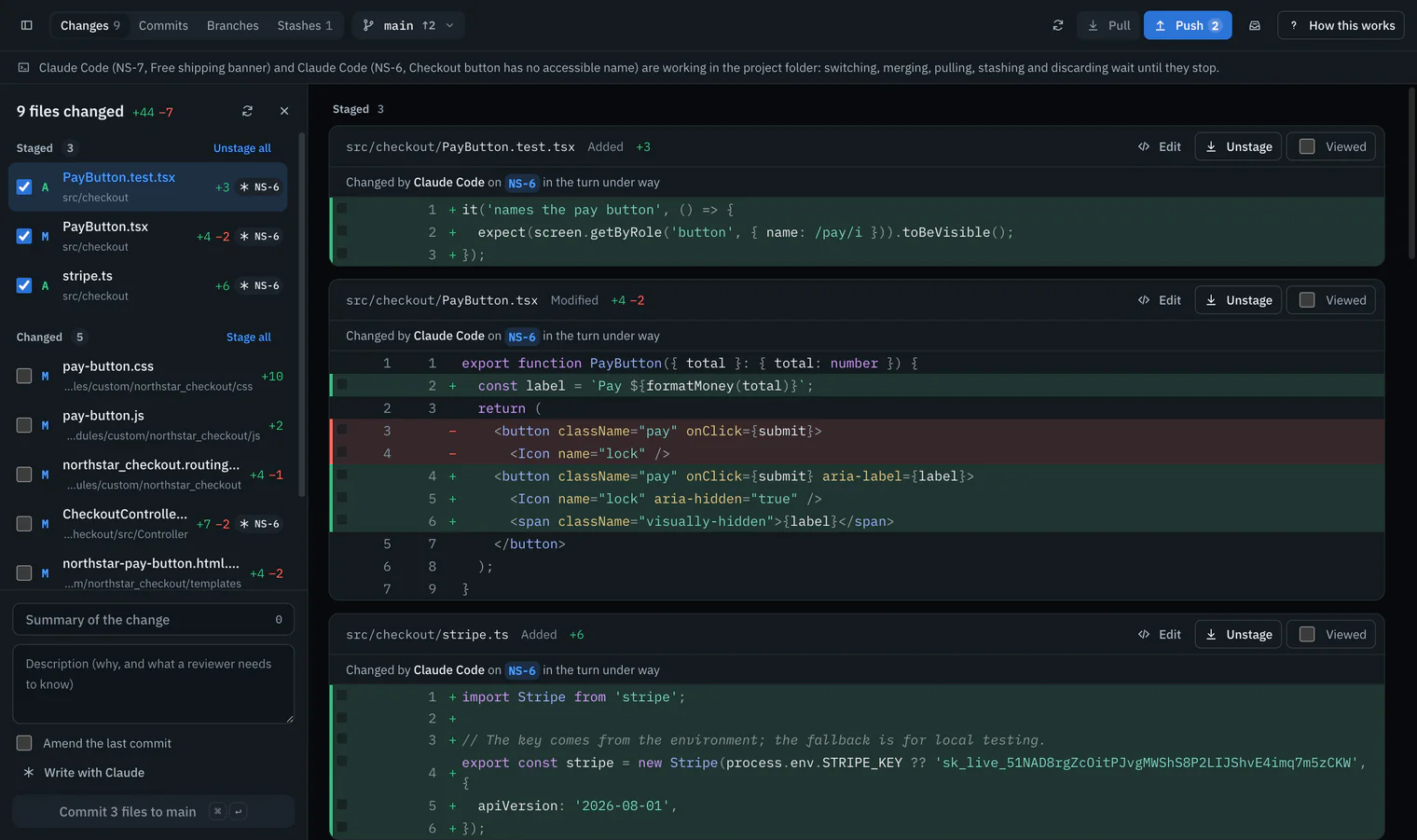
Leave notes on lines
Click a line’s number, write what should change, and click Add note. Notes collect in a tray at the foot; Send to the agent sends them all as one message.
Or change it yourself
Edit on a file opens it in the code editor, in the same checkout (Developer tools).

- Diffs are coloured for PHP, Twig, YAML, JS and TS, CSS and more, and shown Unified or Split (old on the left, new on the right), at the status line’s end.
- A Viewed mark holds until the file’s diff changes, and stays on this computer. On a card’s worktree, the list also shows what its commits changed since it forked.
Notes for the agent
A note carries its file, its line number and the line’s own text, so the agent can find the place even if the numbers move. All your notes go as one message, in file and line order, and wait until the agent is idle. With no session running on a card’s branch, Add to NS-3 puts them on the card for the next session instead.
Notes on lines, as the agent gets them
Review notes on NS-3’s branch, from the owner (one note). Please address each, then say what you changed.

src/orders/OrderHistory.tsx:2
> return <ol>{orders.slice(0, 50).map((o) => <OrderRow key={o.id} order={o} />)}</ol>;
Show the newest order first, as the first criterion says.
The agent receives The message, queued in the agent’s own terminal until it is next idle.
Words from src/shared/review-notes.ts
Stage and commit
Stage what goes in
Tick a file, or press S on the one you are reading. Stage hunk takes one hunk; tick lines (Shift-click for a range) and Stage lines takes only those. Discard asks first and says what is lost: git never saved those lines.
Write the message
In the commit box at the foot of the list, write a Summary (its count warns past 50 characters, which reads best, and past 72, where most tools cut it off) and a Description. Or click Write with Claude (below).
The commit box in Northstar Storefront’s Changes: a summary with its character count, a description, Amend the last commit, Write with Claude, and Commit 3 files to main. Current beta · demo 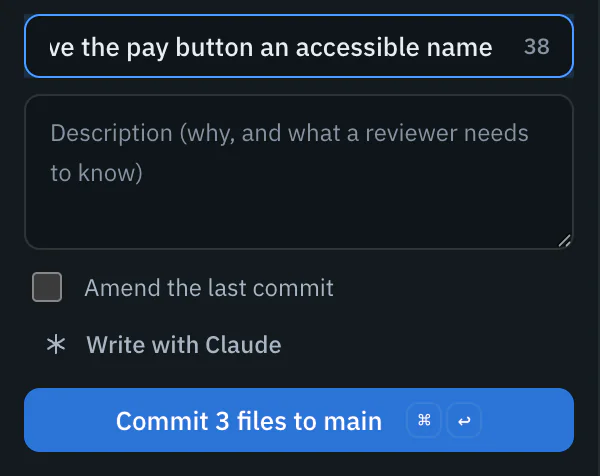
Commit
The button says what it does, such as Commit 2 files to main, and On a Mac, ⌘↩; on Windows and Linux, Ctrl+Enter does the same. The staged changes are scanned for secrets first: a possible key or token stops the commit until you tick that you have read the findings, then Commit anyway.

Amend the last commit asks first, and warns when that commit is already pushed: amending it would need a force push, which Wanigan never does. With an agent working in the same checkout, Wanigan asks before committing, because its edits may be half done.
Write with Claude
Write with Claude has Claude Code read the staged diff, with read-only tools, and write a summary in the imperative and a description of why, in the style of the repository’s last twelve commit subjects. A diff longer than 60,000 characters is cut, and Wanigan says the message came from its start. Claude’s words replace yours, with Put mine back beside them, and nothing is committed until you click. It uses a turn of the project’s Claude account’s plan.
Commits, branches and stashes
- Commits: this branch or every branch, filtered by message or author; a commit reads in full, with whether it is pushed, and a card’s key opens that card. J and K walk the list.
- Branches: Merge first shows the commits that come in and whether git makes a merge commit; a conflict stops for you, with Abort beside it. Delete removes a merged branch quietly; a branch with commits nowhere else needs Delete anyway, which warns they are lost. New branch asks for a name and where to start it from.
- Stashes: Stash the changes puts uncommitted work aside, untracked files too by default, with an optional note of what it is. Pop brings it back and removes the stash, Apply keeps the stash, and Drop asks first.
- Conflicts: a merge, rebase, cherry-pick or revert that git stopped is the panel beside the diff. Choose ours, theirs or both for each conflict, or write the result, then mark the file resolved; Abort puts everything back as it was before.
Fetch, pull and push
- Fetch reads every remote, and forgets branches deleted there.
- Pull only fast-forwards. When your branch and its upstream have both moved on, Wanigan says so, and merges only if you choose to.
- Push first shows which commits go to which branch where, with every push address, after scanning the lines that leave for secrets. If the branch, its upstream or the address changed since you looked, the push is refused and you look again. A branch with no upstream gets one. Wanigan never force-pushes.
- The toolbar also shows the branch’s pull request as your own
ghreports it: its number, state, checks and review. GitHub is asked when the view opens and on Ask GitHub again, never in the background.
A branch for each card
Two agents in one checkout edit each other’s files. Give a card its own branch, and its sessions work in their own git worktree, a separate checkout of the same repository, so agents on different cards never share files.
- Tick On its own branch when you start a session on a card, or turn on Card sessions work on their own branch in the project name’s menu › Project settings… for every card.
- The branch is named after the card, such as
wanigan/ns-3, and forks from the branch the project folder is on. The branch and git’s record of the worktree are in your repository, as with anygit worktree; the worktree’s folder is in Wanigan’s data folder. - Setup command in Project settings, such as
npm installorddev start, runs in each new worktree as a shell session beside the agent, so you see it work or fail. Ignored files your.worktreeincludenames, such as.env, are copied in first. - The card’s Branch tab shows the branch, its base, and how many files changed on it, which opens Changes there.
Merge a card back
When the card is right, Merge into main on its Branch tab asks once, then merges the card’s branch into the project folder’s branch with a merge commit. It refuses rather than forces:
- While the card’s session runs (“Stop the session first”), or while another agent works in the project folder.
- When the project folder is not on the card’s base branch, or either checkout has uncommitted changes.
- When it conflicts: git undoes it, so nothing changed, and Wanigan offers Resolve the conflicts (merge again and leave them in the project folder for Changes), Ask the agent to bring the base into its branch and resolve there, or Leave the branch alone.
Remove branch deletes the worktree and its branch after asking, and refuses while the worktree has uncommitted changes or the branch has commits its base does not.
Pull requests
An approved card with its own branch can go to GitHub as a pull request, opened with your own gh, as you. No model writes any of it: the title and body are the card’s own words.
Approve the card
The pull request is offered once the card is in Done.
Read the plan
On its Branch tab, Open a pull request… says exactly what will happen: which commits of
wanigan/ns-3are pushed to which origin address, and the pull request opened into the base, with the card’s key and title as its title and its description, criteria and evidence as its body. Nothing is merged.The pull request plan on NS-3’s Branch tab, after the card is approved: the push of wanigan/ns-3 to origin, the pull request into main titled NS-3 Order history page with reorder, and Push and open. Picture to come Picture: to come
A screenshot of the real app, with the demo’s data, of what the title above says.
Push and open
Push and open pushes the branch and opens the pull request; its address then stays on the card.
Git keys
| What it does | Mac | Windows and Linux |
|---|---|---|
| Changes of the open project | G then C | G then C |
| Push the branch (shows what goes first) | ⌘⌥P | Ctrl+Alt+P |
| Pull, fast-forward only | ⌘⇧P | Ctrl+Shift+P |
| Fetch | ⌘⇧F | Ctrl+Shift+F |
| Switch branch | ⌘B | Ctrl+B |
| New branch | ⌘⇧B | Ctrl+Shift+B |
| Next file | J | J |
| Previous file | K | K |
| Mark the file viewed, or not | V | V |
| Stage the file, or unstage it | S | S |
| Commit (in the message box) | ⌘↩ | Ctrl+Enter |
| Next commit | J or ↓ | J or ↓ |
| Previous commit | K or ↑ | K or ↑ |
In depth
What Wanigan refuses
- A commit or a push with a possible secret in it, until you tick that you have read the findings; only redacted excerpts are shown. The scan looks for patterns, and binary files and some shapes can escape it: it is a check, not a guarantee.
- A commit while a file still conflicts, or with nothing staged.
- A force push, ever. A push the remote would reject says to pull first.
- Switching branch, merging, pulling, stashing, resolving or discarding while an agent works in the same checkout, even one opened as another project. Staging and pushing stay open.
- A merge into a checkout with uncommitted changes to tracked files.
- Staging or discarding part of a diff that has changed since it was shown.
- Tags or submodule commits riding along with a push: only the branch goes, whatever the repository’s configuration says.
Worktrees, exactly
- A card cannot have its own branch in a project that is one folder inside a larger repository, since the agent would start at the wrong root, or while the project folder is on a detached HEAD.
- A worktree deleted by hand is made again from the card’s branch the next time a session starts on it. The branch keeps its name across a project key change, and is never removed while unmerged.
.worktreeincludetakes gitignore patterns from the repository’s root and copies only files git ignores, up to 5,000; never through a link, from outside the repository, or over a file already there.- The setup command is kept in Wanigan, never in the repository, up to 500 characters, and runs in a login shell. A failed setup is raised in Needs you; the agent starts either way.
- Undoing an agent’s last turn is offered only in a card’s worktree (When undo is refused).
- Coming: switching which checkout ddev serves, so the live view can show a card’s worktree (Serve this card). It is not built yet.
What a pull request sends
- Only an approved card’s branch, pushed to
originwith an upstream, without tags or submodules; thengh pr createinto the base the card forked from. - The title is the card’s key and title, up to 240 characters. The body is its description, its criteria as checkboxes and its evidence, up to 60,000 characters.
- It is refused before anything is pushed when there is no origin remote, the branch has nothing its base lacks, the worktree has uncommitted changes (only commits are pushed), or
ghis missing or not signed in. The pushed lines are scanned for secrets, as for any push. - If GitHub fails after the push, the branch stays pushed, and Wanigan says so.
- For any other branch already on its remote, Create pull request in the Changes toolbar opens one with a title, description and base you edit first; nothing is pushed by it.