
Get started
Accounts and models
In short
Your agents sign in with their own accounts, and Wanigan asks each agent who it is signed in as; each project can use a different one, work or personal. If you prefer, Claude Code can run on a model that lives on your Mac, so prompts and code never leave it.
On this page
Your agents’ accounts
Work and personal, or one plan per client: an agent signed in once has no idea which project should use which. In Wanigan an account is a folder your agent keeps its sign-in in, and each project chooses its own.
Accounts live in Settings › Accounts (also in the palette and the Go menu). Each row says who the account is signed in as, according to the agent itself, with its plan, what its limits have left and which projects use it. Wanigan never holds, reads or copies a password or a token.

| The row says | What it means |
|---|---|
| Who it is, and its plan | The agent says this folder is signed in as that person. |
| Signed out | The agent says nobody is signed in here. Sign in fixes it. |
| Signed out, and a project uses it | The same, in amber, because that project’s next session needs it; Sign in turns amber too. |
| Could not tell whether this account is signed in | The agent gave no clear answer, and Wanigan does not guess. |
| Folder missing | The account’s folder is gone. |
| Claude Code is not installed | The CLI is not on your login shell’s path. The row gives the install command; then press Check again. |
| Same login as … | Two folders signed in to one login. They share one set of limits. |
Choose a project’s accounts
Open the project’s settings
In the project, click its name in the project bar and choose Project settings….
Pick an account for each agent
Under Accounts, choose a Claude Code and a Codex account. Your default follows whichever account is the default. The choice applies at once, to the project’s new sessions.
Northstar Storefront settings: Name and Key, then the Accounts section with its Claude Code and Codex pickers. Current beta · demo 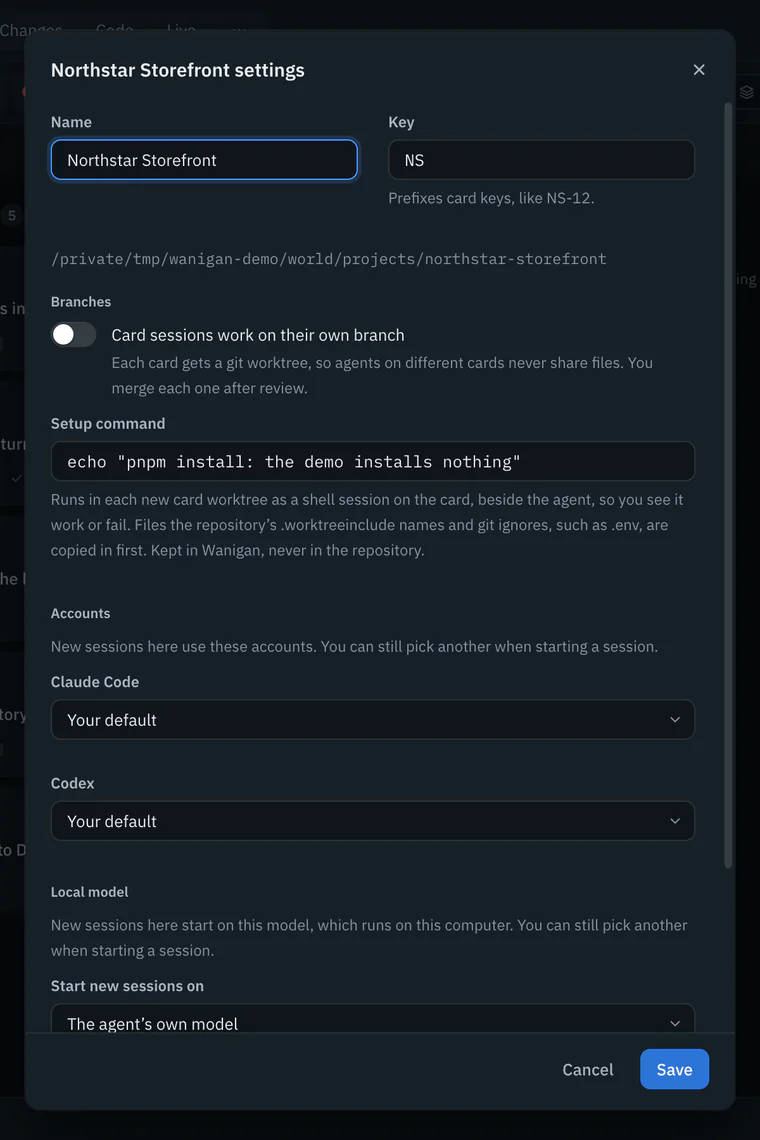
Start a session
New session (On a Mac, ⌘T; on Windows and Linux, Ctrl+T) starts on the project’s account, marked “this project’s”, and shows what that account has left. You can still pick another for this one session.
New session in Northstar Storefront with Claude Code chosen: the Account picker showing the project’s account, and the line under it about its limits. Current beta · demo 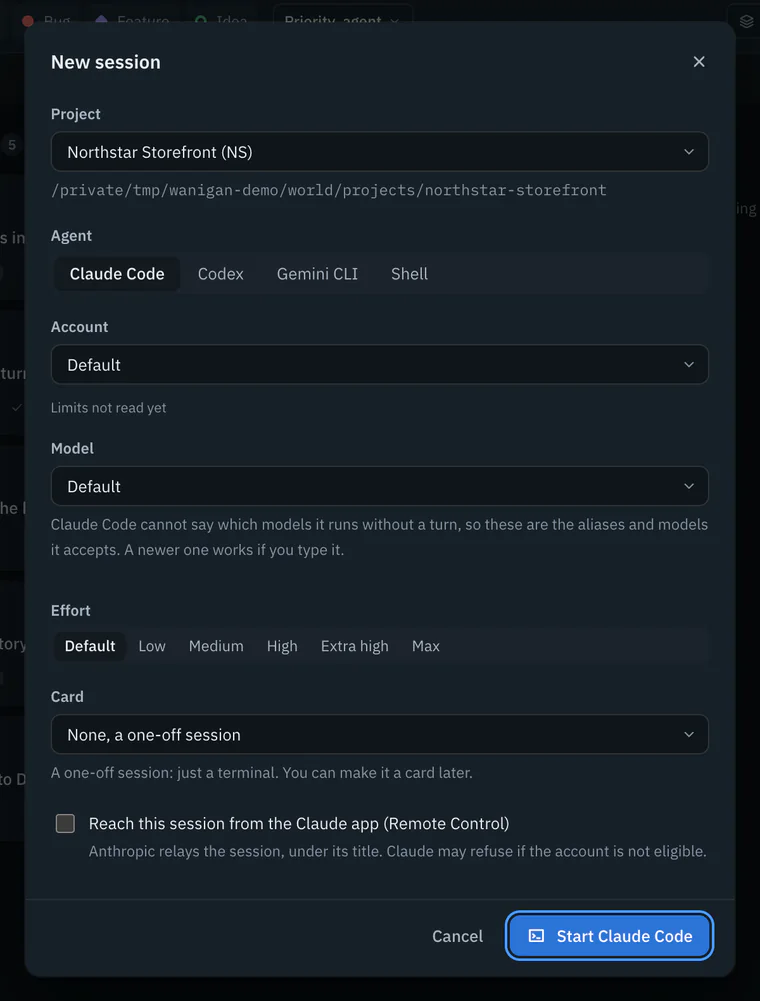


Add an account
Your agents’ usual folders, ~/.claude and ~/.codex, are found by themselves, and so are other account folders in your home named like them. To add another:
Add account
In Settings › Accounts, click Add account beside Claude Code or Codex, give it a name you will recognise, such as “Work” or “Client: Northstar”, and choose Add and sign in.
Sign in in the terminal
Wanigan makes a new folder in your home for it and opens the agent there, in a terminal inside the dialog. Follow its prompts (in Claude Code you can type
/login); your browser opens to finish signing in.Done
Click Done, and Wanigan asks the agent again who it is signed in as.
Sign in on a signed-out row does the same for a folder you already have. Make default makes an account the one every project that has not chosen uses. A row’s More menu has Rename, and Remove from Wanigan, which stops offering the account and leaves its folder and its sign-in exactly as they were. Check again asks every agent who it is signed in as, and reads their limits again.
Usage at a glance
Each signed-in account shows its limits as the agent reports them: a Session and a Week meter, how much is used (or “used up”), when each resets, and how long ago it was read. New session shows the same for the account you pick, as what is left, so a session starts where there is room. There are no dollars anywhere: a plan is not billed per token.
What happens when an account runs out, and carrying a Claude Code conversation on under another account, is on Agents and the board.
Gemini CLI’s sign-in
Gemini CLI has one sign-in, kept where Gemini keeps it, so it has no rows in Accounts and every project uses it. Gemini takes hooks only from its own settings, so Wanigan keeps a Gemini home of its own in its data folder (GEMINI_CLI_HOME), and your ~/.gemini is never written. As each session starts, your chosen sign-in method, your trusted folders and the MCP servers that hold nothing that could be a credential are copied in, and your own skills are linked so Gemini reads them where they are.
- Gemini’s first screen may ask you to sign in or to trust the folder, so send the first message in its terminal; the message box works from the second.
- When Gemini reaches its usage limit it draws a dialog (keep trying, switch model, or stop). Wanigan shows the session as limited, and Needs you sends you to its terminal with Answer in terminal.
- Your own Gemini extensions and global
GEMINI.mdare not loaded in Wanigan’s Gemini home.
Models on this computer
Some work should not leave your Mac, and some days a plan’s limit runs out. Claude Code can run on a model that lives on your Mac, through LM Studio: prompts and code go to it, not to a model provider, and no plan’s limits apply. It is optional. Without LM Studio, Wanigan works exactly as it does, and nothing is downloaded until you choose.
Get LM Studio
Install LM Studio and open it once; Wanigan finds it then. Settings › Local models shows whether it is installed and whether its server is running.
Get a model
Under Models Wanigan knows, Qwen3-Coder 30B runs with Claude Code. Get (17.2 GB) asks first, saying what LM Studio downloads and where (
~/.lmstudio/models); Download 17.2 GB starts it. Progress shows as it goes, Stop stops it, and getting it again carries on where it stopped. Once it is there, the row says On this computer.Settings › Local models in the demo: LM Studio’s server running, Qwen3-Coder 30B with its with Claude Code and Not yet proven badges, on this computer, and Other models on this computer below. Current beta · demo 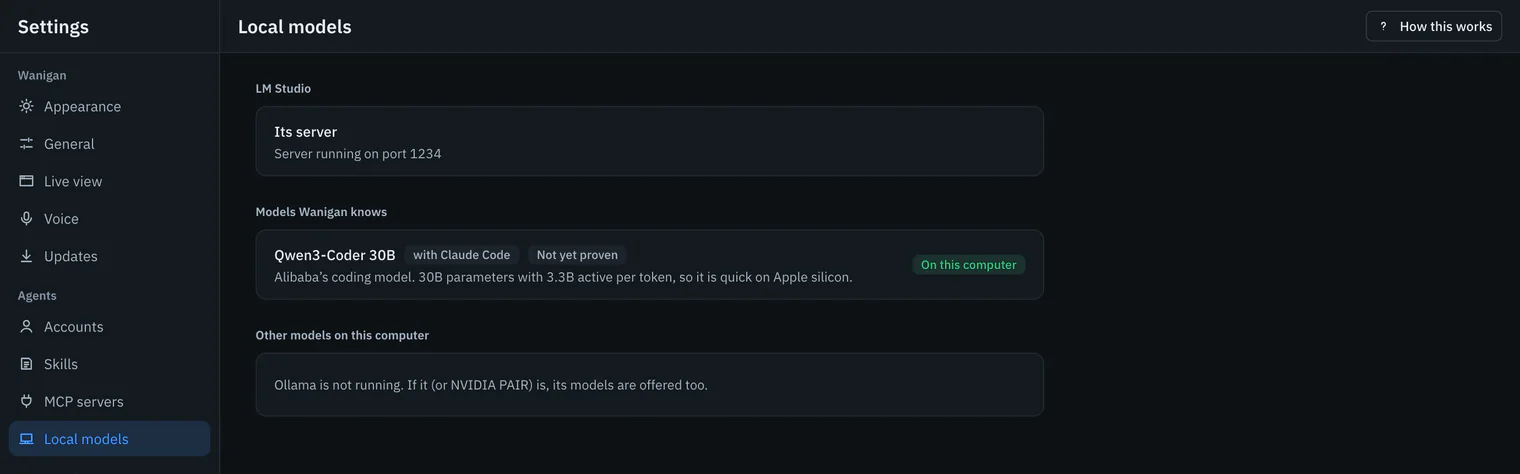
Start a session on it
In New session (On a Mac, ⌘T; on Windows and Linux, Ctrl+T), choose Claude Code, then the model under On this computer in the Model list. The first start loads it, which can take a minute. A local model takes no effort setting.
New session’s Model list open with Claude Code chosen: the Claude models, Another model…, and Qwen3-Coder 30B under On this computer. Picture to come Picture: to come
A screenshot of the real app, with the demo’s data, of what the title above says.
Make it a project’s default
In Project settings…, Local model › Start new sessions on makes the project’s new sessions start on it, and on its agent. The section appears once a local model is on your Mac.

Ollama and NVIDIA PAIR
If Ollama is running, or NVIDIA PAIR, which answers at Ollama’s address, its models are offered too, under On this computer, with Claude Code or Codex, and listed in Settings › Local models under Other models on this computer. Wanigan never downloads through them: add models with Ollama itself. A model they do not have refuses to start.
In depth
How accounts are found
- The default folders.
~/.claudefor Claude Code and~/.codexfor Codex are each listed as Default. The default account sets no variable when a session starts: pointing Claude Code’sCLAUDE_CONFIG_DIRat~/.claudemakes it read a different file and report a signed-in person as logged out. Any other Claude Code account is its folder asCLAUDE_CONFIG_DIR; a Codex account, its folder asCODEX_HOME. - Other folders. A folder in your home named
.claude-or.claude_and then a name (or.codex-,.codex_) is listed when it holds one of the files that agent keeps there, named after what follows the dash or underscore. - Who it is. Wanigan asks the agent itself, as that account:
claude auth status --jsonfor Claude Code; for Codex, its app server, falling back tocodex login status. A missing credential file is not taken to mean signed out (on macOS the sign-in may be in the Keychain): only the agent’s own answer can say no. - Limits.
claude -p "/usage"for Claude Code (a built-in command, not a model turn, run outside any project) and Codex’s app server for Codex, two accounts at a time, read again when older than ten minutes. A reading that fails says why, never shows a number. - One login, two folders. Two accounts count as one login only when both report the same email; they are flagged because they share limits.
- Which account a session uses: the one you pick in New session, else the project’s, else the default. A
CLAUDE_CONFIG_DIRorCODEX_HOMEyour shell exported is taken out for the session, so it runs as the account chosen. - Adding makes
~/.claude_<name>or~/.codex_<name>(the name in lower case, other characters as underscores, a number added when it is taken), readable only by you. A name is 1 to 60 characters. - Removing is refused for the default (“Make another account the default first.”). A project that used a removed account falls back to the default.
What starting a local model does
Before Claude Code starts on an LM Studio model, Wanigan makes the model ready, and refuses with a reason at the first step that fails:
- The model must be in LM Studio. One not downloaded yet is refused: “Qwen3-Coder 30B is not on this Mac yet. Get it in Settings › Local models (17.2 GB).”
- LM Studio’s server is started if it is off, and its real port is read from
lms server status --json: it is not always 1234. - If the model is not loaded yet, LM Studio first estimates its memory (
lms load --estimate-only) with room for an agent: 65,536 tokens of context for Qwen3-Coder 30B, because an agent’s instructions and tools alone take tens of thousands. A model LM Studio says will not fit is refused, saying how much it needs and “Close some apps and try again.”, rather than loaded until the Mac swaps. - It is loaded with that context, and Claude Code is pointed at the local server for every model it might pick, the main one, helpers and subagents, with
ANTHROPIC_API_KEYtaken out so an account’s own key cannot win over the server. - Claude Code is told to send Anthropic no telemetry or error reports (
CLAUDE_CODE_DISABLE_NONESSENTIAL_TRAFFIC), given 30-minute stream timeouts, since a local model can take minutes to read Claude Code’s opening prompt, and told the context the model was loaded with, so it compacts before it overflows.
Only a model Wanigan knows is downloaded, one attempt at a time. Free space must cover the whole model plus 10 GB; when Wanigan cannot read the free space, it refuses rather than guesses. The model is kept with the session, so resuming keeps it.
Wanigan looks for Ollama at 127.0.0.1:11434. Codex starts on one of its models with --oss --local-provider ollama; Claude Code is pointed at it as at LM Studio. Codex on an LM Studio model is given LM Studio’s real address, because Codex’s own LM Studio setting assumes port 1234.
Proven or not yet proven
A model that answers is not yet a model that works as an agent: an agent has to call tools, such as reading a file or running a command, in the form its CLI expects. So every model says whether its pairing with an agent has been proven: a real turn with a tool call, read back from Wanigan’s own record.
- Proven, with when: that model and that agent did it.
- Not yet proven: offered, and said so wherever you pick it: “Not yet proven with Claude Code: it may not use tools reliably.”
- A model Wanigan has no description for, one you added to LM Studio or Ollama yourself, is offered as not proven with that agent.
npm run local:check, run from the source, is that proof: Claude Code on Qwen3-Coder through LM Studio, in the real app, the way you would do it (New session, the model, a request to read a file). It checks from Wanigan’s record that the session started on the local model, LM Studio loaded it with its context, the agent’s hooks reported a turn with a Read tool call, and the answer came back. It spends nothing, needs LM Studio with the model on disk, and is never part of npm test.