
The live editor
Picking and the Inspector
In short
A note in a chat loses which part of the page you meant; a part chosen on the page keeps it. Once a part is chosen, the Inspector says what made it, whose code that is, the data behind it, and every way to change it.
On this page
Pick a part
Start selecting
Press P, or Select a part on the page in the toolbar. The status line says “Selecting: point at a part, or walk with the arrows and press Enter”, and anything that moves on the page, such as a carousel, holds still.
Selecting on the Northstar front page: the pointer over a product card, which has a light blue fill and the name of what made it, and the status line saying Selecting with Stop.. Picture to come Picture: to come
A screenshot of the real app, with the demo’s data, of what the title above says.
Point, or walk
Point at a part and it is outlined, named by what made it. From the keyboard, ↑ goes out to what holds it, ↓ into its first part, and ← and → to the parts beside it. Selecting starts on the part already chosen, or on the page’s main content.
Choose it
Click, or press Enter. A click while selecting chooses the part and never follows a link. The Inspector opens on the part, with the keyboard on its name.
The Northstar hero chosen: outlined in blue on the page with its action bar, and the Inspector on the right showing its breadcrumb, its name and kind, and the Design tab.. Picture to come Picture: to come
A screenshot of the real app, with the demo’s data, of what the title above says.
Stop, or clear
Esc, or P again, stops selecting. With a part chosen, Esc in the Inspector clears the choice and takes the keyboard back to its row in Layers.
A part chosen in Layers has its element chosen on the page too, so it offers exactly what a pick offers.
Layers
Layers, in Structure on the left, is the page’s parts as a tree, named the way the site names them. On Drupal: its templates, components, content, fields, blocks and regions, read from Twig debug’s own comments. On WordPress: its template files, template parts and blocks, and Elementor’s elements. With the helper, each part takes the site’s own label (“Opening hours”, not a block’s machine name).
Pointing at a row outlines its part on the page. However a part is chosen, the tree marks it, opens down to it and scrolls it into view; a part the last edit changed carries a mark. Icons, images and form fields stay folded until you switch on Icons, images and form fields too. The arrow keys walk the tree, and On a Mac, ⇧D; on Windows and Linux, Shift+D shows the row’s part in DevTools.

Drupal marks its templates only while Twig debug is on (Configuration › Development › Development settings); the Drupal helper switches it on for you. With no marks, Layers says “Nothing on this page says what made it”, and you can still select a part to point an agent at it.
The Inspector
The Inspector, on the right, starts with where the part sits (a row of the parts around it, each one a link that chooses it), its name and its kind (“Component · northstar”), Show in DevTools (On a Mac, ⇧D; on Windows and Linux, Shift+D) and Clear the choice (Esc). Then three tabs: Design, Made by and Data.
Design
Design is what to do with the part. Five buttons, each with its key:
| Button | What it does | Key |
|---|---|---|
| Edit ▾ | Every way to change it, in one menu, grouped by where the change is saved. | E types on its words when the part is only words, and opens this menu otherwise |
| Move | Up, down, or to another place it may go, where the site keeps an order. Save the move saves it; Put it back does not. | M |
| Code | Its template or component, in the code editor, at the words you picked. | . |
| Alone | The part with nothing around it, in your theme. Needs the helper. | On a Mac, ⇧A; on Windows and Linux, Shift+A |
| Take out | Takes it out of where it is placed: only its place goes, never what it shows. | On a Mac, ⇧X; on Windows and Linux, Shift+X |
Edit ▾ groups every route by where the change is saved:
- In the site · saved by Drupal as you (or WordPress): what the helper’s trace says can be edited here, each opening the site’s own form beside the part or a small form, and saying first when it makes a new revision or shows beyond this page; and the part’s admin page, such as Block settings or Edit the view, opened in the live view.
- On the page · in the design layer, nothing saved yet: Retype the words (E), Retype in a box and Try a style (typing, styles).
- In code: its template file, opened in the code editor (.), and Create override…, a copy of someone else’s template for this part only, in your theme.
Under the buttons come the form the one you pressed opens, what you just added to the layer (“In the layer, as a draft:”, with Open Edits), and Tell an agent, a note about this part that goes to an agent with its picture (Build with an agent). When several parts on the page are made the same way, it says how many, and that “an edit to what made it changes them all”.
Made by
Open Made by
With a part chosen, choose the Inspector’s Made by tab.
The Inspector’s Made by tab for the Northstar product title: the core template that rendered it, the theme hook, where to copy it in the theme to change it, and the hooks that shaped it from the trace.. Current beta · demo 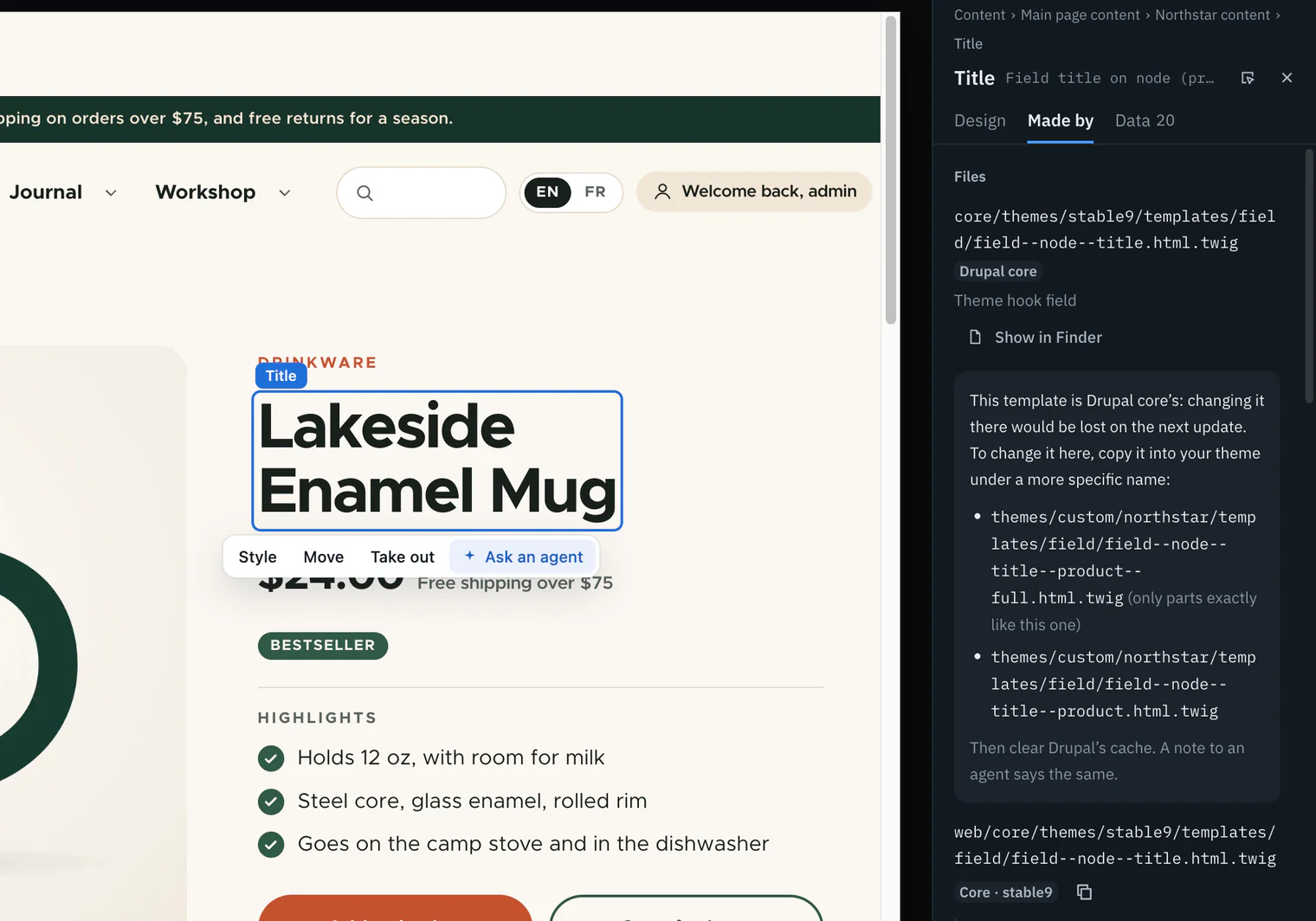
Read the files
For a component: its id, its description, its folder, its files (each opens in the code editor) and its props, each with its type and whether it is required. For a template: its file, whose code it is (Your code, Contributed or Drupal core) and its theme hook. Show in Finder (File Explorer on Windows) opens the folder.
Read the trace
With the helper come the file and line that made it, with its owner and package; what shaped it, in the order it ran, each step timed with what it changed and the slowest marked; and the templates it could have used, most specific first, each said as used, exists or not made. Then Cache, Cost, History and Access, each folded until you open it.

What made this part
- The element you picked on the page.
- The part around it. With the site helper, each piece of output is wrapped in
wl:partcomments, so Wanigan knows exactly which render made it. Without the helper, Drupal’s Twig debug comments name the template. - The template: Drupal’s Twig file, or the file WordPress’s template hierarchy chose, with the other templates the site could have used, and its file and line.
- What shaped it: the preprocess functions, hooks and filters it went through, each timed, with what each changed.
- What it is: the content, component, block or configuration it shows.
- Whose code: your code, contributed, core, a plugin, a theme, or owner not known, with the package it comes from.
When a template is Drupal core’s or a contributed project’s, changing it there would be lost on the next update. Made by lists the names to copy it to in your theme, most specific first, then says to clear Drupal’s cache. Create override… in Edit ▾ makes the copy when you ask; on WordPress it copies a parent theme’s template into the child theme.
Cache says how long the part is kept, which cache tags clear it and which contexts it keeps a copy for. Cost gives its render time and its queries, slowest first, measured in this render on this computer. History lists its revisions; Access says whether the user logged in in the live view may see it.
Last come AI on this site, what the site’s core reports of its AI and what else runs when it is saved, and The element: its tag, its words and its CSS path.
Data
Open Data
Choose the Data tab. Its count is how many variables the trace names for the part.
Read the values
It says which content the part shows, then lists each variable the template received: its name, its type, a preview of its value, and the step that set it. Where something you can edit sets a value, Edit opens it.
The Inspector’s Data tab for the Northstar hero: the variables its template received, each with its name, type tag, a preview of its value and the step that set it.. Picture to come Picture: to come
A screenshot of the real app, with the demo’s data, of what the title above says.
Values are previewed, never rendered: at most 400 characters, render arrays summarised, and anything named like a key, token, password, secret, hash, salt, nonce, session or cookie shown as [redacted]. Without the helper there is nothing to read, and Data says so.
The action bar
Above the chosen part on the page floats its action bar: Style (try a style, see Styles, live), Move, Take out and Ask an agent, which takes the keyboard to the Tell an agent box. Each does what its button in the Inspector does, and the page itself never hears the press. The bar shows only while nothing else has the page: not while selecting, typing, dragging or placing.
Keys
In depth
How parts are named
Names come only from what the site wrote into the page, never guessed:
- Drupal’s Twig debug comments (
BEGIN OUTPUT from,END OUTPUT from,THEME HOOK,FILE NAME SUGGESTIONS), single-directory components’ start and end comments, and the helpers’ marks, nested by what contains what. - A component by its own
.component.ymlname, its kind “Component” and its provider. - Content by its bundle and number; a field, a region, a view or a menu by its name; a block by its id and plugin.
- A WordPress block by its block name (its kind “Block · core”, for one of core’s), a template part as “Header part” and the like, and an Elementor element by its widget.
- With the helper’s trace, the site’s own label wins. A template nothing else names keeps its file name.
- The page and its wrappers are structure, not parts, and are left out of the breadcrumb.
Whose code it is
Without the helper, a template’s owner is read from where its file sits:
| The path holds | Said as |
|---|---|
core/, wp-includes/ or wp-admin/ | Drupal core (core) |
contrib/, vendor/, node_modules/ or wp-content/plugins/ | Contributed |
wp-content/themes/ | Not said: it may be your theme, or the parent theme yours is a child of |
| Anything else | Your code |
The helper’s trace says it outright for every file and every step: Your code, Contributed, Core, A plugin, A theme, or Owner not known, with the module, plugin or theme it belongs to.
The trace
The Drupal helper reads each render through core itself: every template’s output becomes a part where its final variables, file and output meet (TwigThemeEngine::renderTemplate(), or ThemeManager::render() before 11.3); suggestions, preprocess functions and every hook implementation are timed in the order core runs them; Renderer::doRender() gives each part its cache metadata and assets. It covers Drupal 10.3 to 11.4, using its own classes only where core’s signatures match.
The WordPress helper does the same through core’s hooks: templates and the hierarchy’s candidates, block templates and parts, blocks, content, shortcodes, widgets and menus, each filter callback timed with whether it changed anything.
Each part has an id, a kind and a label, and from helper version 4 an identity: what the site stores it as, so it is found again after a reload or a reorder. A trace is bounded (4,000 parts, 200 variables a part), and one over 16 MB is not read.
When a page has no trace, the editor says why, with the one thing to do:
| It says | What to do |
|---|---|
| The site helper is not installed | Set up the helper. |
| This site’s helper answers to another Wanigan | Set it up again here. |
| Update the helper to see this | Update the helper. |
| This page came without a trace | Reload: a cached copy or an error page carries none. |
| This render’s trace is gone | Reload: the helper keeps a page’s trace for ten minutes. |
| The helper would not give the trace | Log in, in the live view, as a user who may administer the site, then reload. |
| The site did not answer | Start the site, then reload. |
| The trace is too large to read | A page with fewer parts, or an updated helper. |
When something cannot be done
A button that cannot act says why, rather than doing something else:
- Code: “Nothing around it says which file made it”, or “Its template is outside the project’s folder”.
- Alone: “Showing a part alone needs the site helper”.
- Move and Take out: “Nothing says it can be moved here”, “Nothing says it can be taken out here”. Take out is refused wherever core would delete what the part showed.
- Edit ▾ with nothing to offer: tell an agent instead.
- A hosted environment: “This environment is read-only: nothing here can change it.”