
Agents and the board
Jev
In short
Jev is TypeSafe’s decision model: it reads each new card and says what to do with it, how much it matters, and whether it repeats another card. Its read is advice, unless you let a project accept confident cards that already say what done means.
On this page
What Jev does
Agents file cards faster than anyone can sort them. Jev gives each new card a first read, as a short typed answer rather than prose: a choice, a score, a yes or no. Claude still writes criteria, reviews and code; Jev only advises on the card.
| Jev suggests | Meaning |
|---|---|
| Ready | Real work worth doing now. |
| Later | Real, but not worth doing now; it will come back by itself if it matters. |
| Close | Not worth carrying: speculative, superseded, or already covered by other work. |
| Duplicate | Repeats one of the cards listed with it: the same defect or the same work. |
| Needs a decision | A question or decision that needs your answer before anyone can work on it. |
| Split it | Too big for one working session. |
How much a card matters is a score on four steps, drawn as a four-step meter: cosmetic and barely noticed; a noticeable polish issue; something that often hurts the people using it, or the team; and something that breaks what matters, such as checkout, data, sign-in, deploys or builds.
Turn Jev on
Get a key
Jev needs a TypeSafe API key, from TypeSafe’s console (
console.typesafe.ai/keys). Without one, nothing is ever sent.Add it in Settings
In Settings › Jev, paste it into TypeSafe API key and click Save and test: Wanigan saves it for its core and asks Jev something trivial to show it answers. Or export
TYPESAFE_API_KEYin your shell; a key there wins over a saved one.Settings › Jev in the demo: the Connection group with the key and Test the connection, So far with calls and the estimate, and In each project with Off, Reads and Reads and accepts for each sample project. Current beta · demo 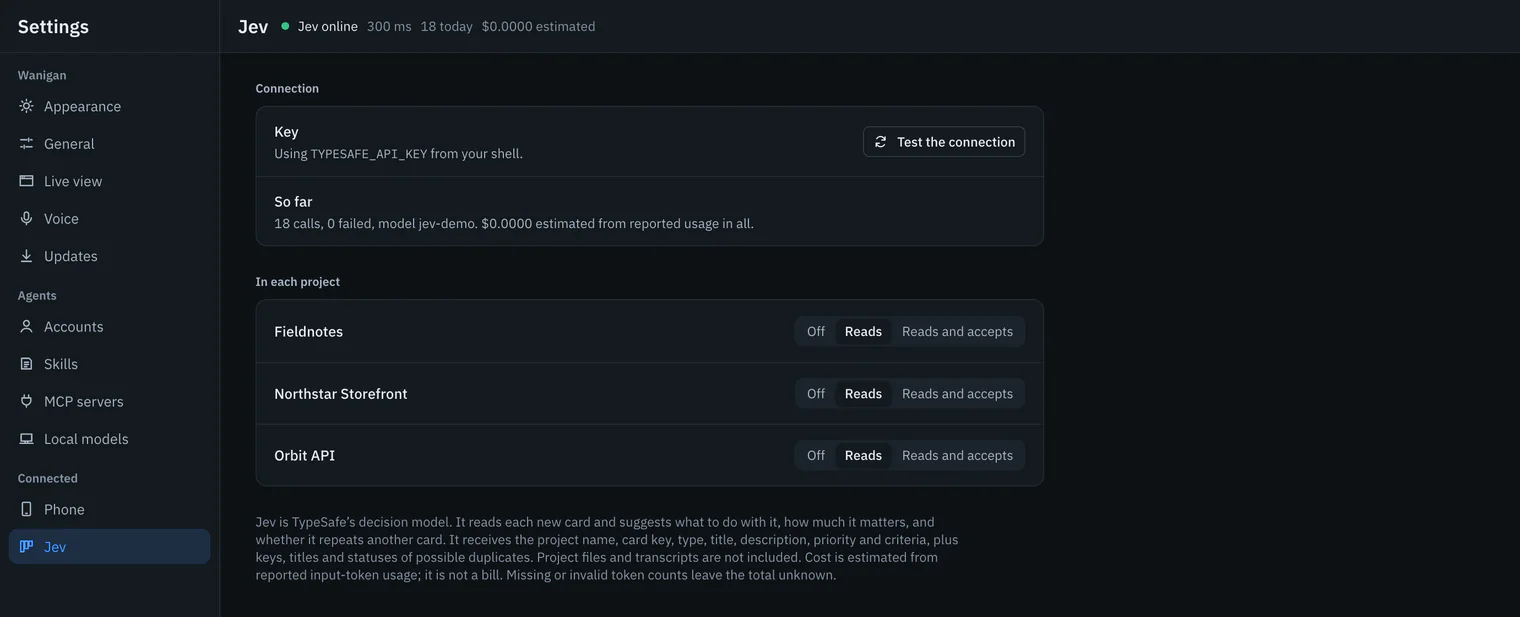
Choose each project’s mode
Under In each project, or on the Jev strip above a board, choose Off, Reads or Reads and accepts. A project starts on Reads.
File a card
Jev reads it a moment later, and its read appears on the card. Read unread cards, on the board’s Jev strip, reads the open cards it has not read yet.

Reading Jev’s read

- On a card in the Inbox, a chip gives the suggestion and how sure Jev is, such as Ready 86%, or Same as and another card’s key, beside the four-step meter. Jev ✕ means the read failed; point at it for why.
- In the card’s drawer, Jev’s read gives the suggestion and what it means, a likely duplicate with its odds, how much it matters in words, and Jev’s odds for each action. Accept to Ready and Archive as a duplicate are one click away, and Read again asks once more.
- On the board, Order › Jev: matters most puts the cards that matter most at the top of each column.
- The strip above the board says whether Jev is online, its typical answer time, its reads today and the estimated cost, or that it is not answering, and why.
Advice or accept
| Mode | What Jev does |
|---|---|
| Off | Reads nothing in this project. Turning it off also stops reads waiting in line and retries; a request already sent cannot be recalled. |
| Reads | Reads every new card and suggests. It changes nothing. |
| Reads and accepts | Also moves a card to Ready itself when the card is in the Inbox, Jev says Ready with at least 80% confidence, and the card already has acceptance criteria. |
An accepted card says so in its history, as “Jev: ready (86%), and it already has acceptance criteria”. If anyone changed the card’s title, description, type, priority or criteria while Jev was reading it, the read is shown and nothing is accepted. A duplicate is shown as one only at 90% or more, and Jev never archives anything: that is your click.
Calls and cost
Every HTTP attempt to TypeSafe is counted, failed ones included. A busy answer is retried up to three times with growing waits, and an unreachable service once. Cost is estimated from the input tokens TypeSafe reports on each successful answer, at $0.042 a million: an estimate, not a bill. When an answer reports no usable count, the total says Cost unknown, and the known part is shown on its own. Settings › Jev › So far shows calls, failures, the model and the estimate.
The board never waits for Jev. If TypeSafe is out of reach, the card is filed at once and says Jev could not read it, and Jev shows as not answering. After a failure, the reads still waiting are dropped rather than retried; Read unread cards asks again.
In depth
What is sent to TypeSafe
A read is one request to https://api.typesafe.ai/v1/systemone, for the model jev-latest, with your key as a bearer token. It carries:
| Sent | Exactly |
|---|---|
| The project | Its name. |
| The card | Its key, type, title and priority (P0 to P3); its description, cut at 1,200 characters; and up to eight of its criteria. Whatever you or an agent typed there, code included, goes as written. |
| Possible duplicates | For a card in the Inbox only: up to five other cards in the same project that share words with it, each as its key, title and status, never its description. |
| The questions | How much the card matters; for a card in the Inbox, what to do with it; and for each possible duplicate, whether it is the same problem or the same work, naming that card’s key and title. |
No project files, transcripts or session output are read to build it. The possible duplicates are chosen on your Mac by plain word overlap; Jev decides whether they really match.
Where the key stays
- A saved key is a file in Wanigan’s data folder that only your user can read. Only the core uses it, and it is never sent back to the window: Settings shows that a key is saved, never the key. Forget the key removes the file.
TYPESAFE_API_KEYis read from your login shell, and wins over a saved key; Settings then says it is using it.- A key is one word of up to 400 characters; anything else is refused as not looking like a TypeSafe API key.
- A paired phone never reaches Jev’s key, and no test reads yours.
- Wanigan calls TypeSafe only once you have given it a key, and each project can turn Jev off.
The rules, exactly
- Jev reads a card when it is created in a project that is not Off. At most two reads run at once, each with a 30-second limit.
- Only a card in the Inbox is asked what to do with it and whether it repeats another; any other card is only scored.
- Odds and confidence must be numbers from 0 to 1. Anything else in an answer is left out, never guessed, and cannot accept a card.
- The newest 5,000 calls are kept in detail; older ones are folded into running totals, so the counts and the estimate survive.
- A 401 means TypeSafe refused the key: check it in Settings › Jev.