
The live editor
Verify, and reading a verdict
In short
A save that says “done” does not prove the page looks the way you designed it. Verify renders your page twice, once with Wanigan’s layer and once without, compares them, and tells you in plain words whether the site now shows your change, and where it does not.
On this page
Why verify
“Saved” is not “shows”. A text format can clean up what was stored, a template can add words around a field, and a cache can hold the old page. Once an edit is made real, the page without the layer should look exactly like the page with it. Verify checks that, the same way every time, as Wanigan’s own check.
Run Verify
Make it real first
Words are verified once they are In the site, not verified. A style or a token is put in the theme outside Wanigan, by an agent from its brief or by you, so Verify on its draft is how Wanigan finds it there. Verify needs the site helper. See Make real.
Choose Verify
Choose Verify on the edit in Edits, or Make real › Verify … on this page in the toolbar for every edit there that is in the site or handed to an agent. Verify on one card checks every edit on that element together. It renders in hidden windows, so your own view does not move while it runs.
An edit in Edits while Verify runs: the button reads Verifying…, and the line under it says the page is being rendered with and without the layer, twice for the noise floor, at each width. Picture to come Picture: to come
A screenshot of the real app, with the demo’s data, of what the title above says.
Read the headline
A pass says Verified at 390 and 1440 px: the site renders it as designed, and the edit becomes Verified. A failure says Not verified, names the step that failed and lists each difference; the edit stays In the site, as made. A style or token draft that is not in the theme yet says Not in the site yet on its own card, which step failed and at what widths, and its first two differences, such as “At 1440 px, the title: font-size is 52px in the site, 63px in the design.”; it stays a draft.
A verdict that passed, in Edits, for the Northstar product title: what was set aside and why, the noise floor, “Checked just now”, and the Before, Design, Site and Difference pictures at 390 and 1440 px. Current beta · demo 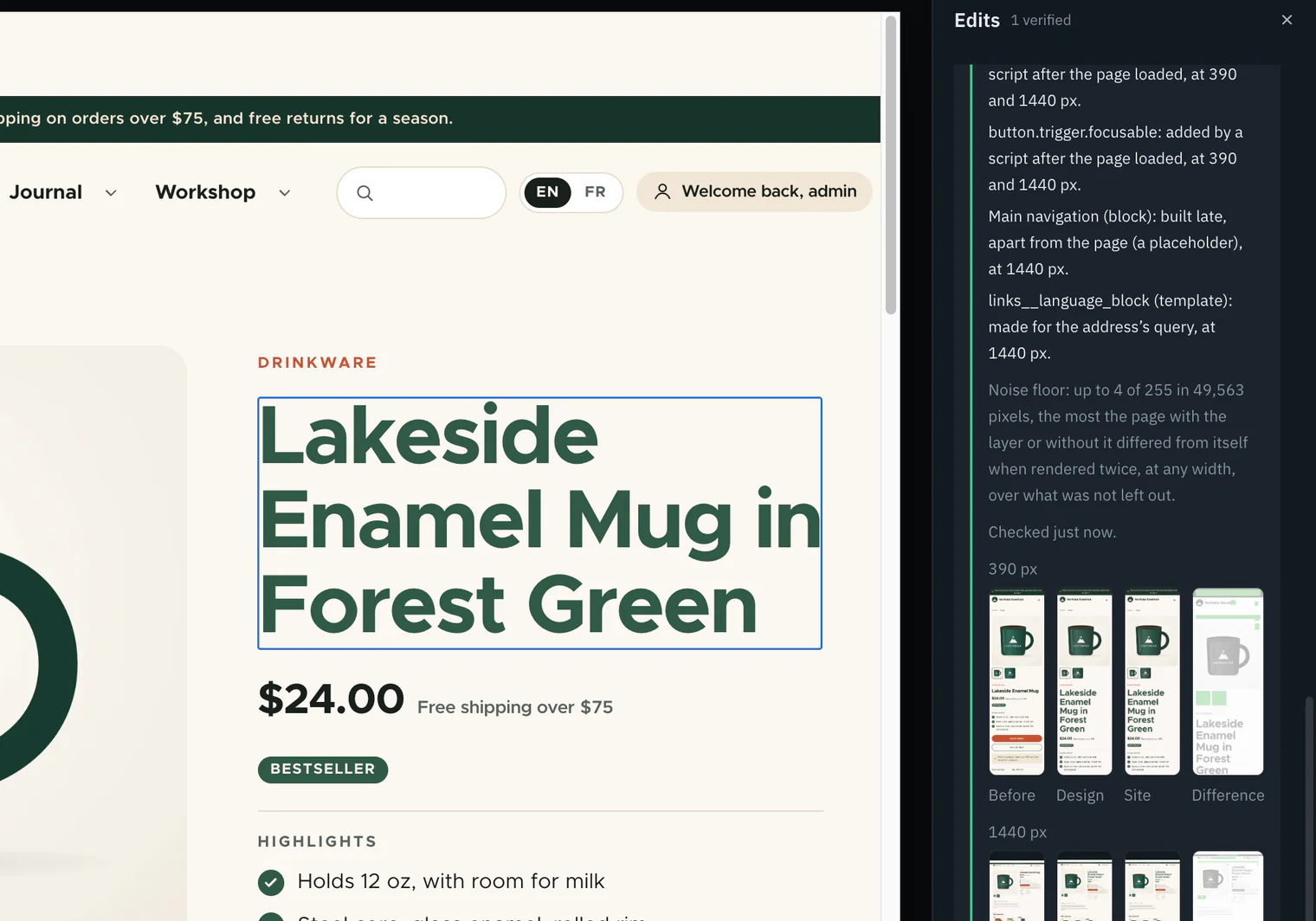
Open the pictures
Each width has The page before (when one was kept), The design, The site and Difference. Each opens larger. In Difference, the site’s page is faded to grey, pixels that differ beyond the noise floor are magenta, and parts left out of the comparison are pale green.
A verdict’s Difference picture opened larger: the site’s page faded to grey, any pixels that differ past the noise floor in magenta, and the parts left out in pale green. Picture to come Picture: to come
A screenshot of the real app, with the demo’s data, of what the title above says.
Retire it
A verified edit has Retire, which archives it and takes it off the list.

How Verify works
At a phone’s width (390 px) and a desktop’s (1440 px), Wanigan renders the page in hidden windows that share the live view’s session: twice without the layer, which is the result, and twice with it, which is the design. The two renders of each version show how much the page differs from itself, the noise floor. Parts the site says change from one render to the next are left out. Then three steps run in order, and the first that fails decides the verdict.
Each hidden window stays one screen tall, as a person’s screen is. Wanigan scrolls through the page a screen at a time, so whatever loads once it is in view loads, goes back to the top, reads the page’s height once, and pictures the whole page beyond the screen. The window is never grown to the page’s height: a page built to fill at least a screen would grow with it and never settle, and two renders would differ for no reason.
How Verify decides
- The page from before. Just before a save, or before a style’s brief goes to an agent, the page is rendered without the layer, then in the same load with the one edit, and kept.
- Render. At 390 and 1440 px, in hidden windows one screen tall, the result twice and the design twice, each pictured whole and all held at one time and seed so nothing moves between them.
- Leave out the noise. Whatever changes between two renders of the same page is measured and left out, and said as left out. An edited element is never left out.
- Step 1, styles. The styles and boxes of what was edited, against the design.
- Step 2, pixels. The pixels around the edit, 8 px beyond it, against the design.
- Step 3, the rest. The rest of the page against the design and, element by element, against the page from before.
- The verdict. The first step that fails decides, for every edit on the element at once. A pass makes the edit Verified; a failure leaves it In the site, with the step, each difference and the pictures. A style or token draft that passes is in the theme, and becomes Verified; one that fails is not there yet, says its first differences, and stays a draft.
One element, one check
An element can carry more than one edit: new words made real, and a style for it handed to an agent. Verify on any of their cards checks every edit on that element together, in the same renders, and each card gets the verdict. A style counts once it has been handed to an agent, which is when Make it real kept the page from before for it; a style nobody has handed over yet is left out unless it is the card you pressed, so verifying words never waits on a style. A style made while the element’s words were still a draft is found after those words are saved, because Verify knows every word edit in the layer.
- The styles and boxes of the edited elements. Every value the layer can set, the element’s words and its box must be the same in the site as in the design; the verdict names the exact property. A token is checked as its custom property on the page’s root.
- The pixels around them. Inside each edited element and 8 px around it (a shadow, an outline, the soft edge of text), within the noise floor.
- The rest of the page. Away from every edited element, the site must match the design; and, when Wanigan kept the page as it was just before the save, it is compared with that too, element by element.
Reading a verdict
A verdict is said in sentences, not scores. These are the sentences it uses, with made-up values.
| It says | What it means |
|---|---|
| Verified at 390 and 1440 px: the site renders it as designed. | All three steps passed at both widths. The edit is Verified. |
| Verified … against the design … It was not compared with the page as it was before. | The steps passed, but step 3 had no page from before; the line under it says why. |
| Not verified at 390 and 1440 px: the site does not render it as designed yet. | A step failed. The edit stays In the site, with this verdict. |
| Step 1 of 3, the styles and boxes of the edited elements failed; the steps after it were not judged. | The first failing step decides. |
| At 390 px, h1.title: font-size is 28px in the site, 32px in the design. | One value of an edited element differs, by name. |
| At 1440 px, 212 pixels differ around it, by up to 64 of 255, in a 300 × 40 box at 120, 480. | Step 2: pixels near the edit differ beyond the noise floor. |
| … differ away from every edited element … the change reached further than it should. | Step 3: something away from your edit changed. This is a leak. |
| …, away from the edited elements, says “…” in the site, “…” on the page as it was before it was made real. | Step 3: an element’s words changed since the page from before. |
| The same words also changed in one other place on the page, where the site shows the same stored value: … | The save’s own reach, such as a breadcrumb that shows the same title. Said, never a failure. |
| Left out of the pixel comparison, because the site says they change from one render to the next: … | Parts left out, each with why. See what is left out. |
| The site’s helper held relative dates and random orders still for every render, so they were compared rather than left out. | Things that change on their own were held still instead of left out. |
| At 1440 px the page is 9,200 px tall: compared down to 6,000 px, and nothing below that. | A statement, whether the verdict passed or not. |
| Noise floor: up to 3 of 255 in 40 pixels, … | How much the page differed from itself. See the noise floor. |
Nothing passes for want of a comparison. An edited element not found on the page, one that vanished before it was measured, a token whose value could not be read, and an edit for a named breakpoint all fail, each saying so.
What Verify does not check
- Only this page, at 390 and 1440 px. Other pages that use the same template, or a token every page reads, are not checked.
- Hover, focus, other breakpoints, dark mode and other lengths of text are not checked in this build.
- Below 6,000 px down the page nothing is compared, and the verdict says so.
- A change the save made beyond your edit is caught only when Wanigan kept the page from before. See the page from before.
- A text format may change what was saved. Verify shows that difference; it does not hide it.
After a save that moved the page
A save that gives the page a new address, such as a new title with Pathauto, takes the live view to the new address. The edit keeps the address it was made on, and Verify renders that one. If the site sends the old address on to the new one, the hidden window follows, since it stops only what would leave the site. If the old address no longer shows the page, the element is not found there and step 1 fails, saying so. The toolbar’s Verify covers edits made on the page you are looking at, so after a move, use Verify on the edit in Edits.
In depth
The noise floor
Each version of the page is rendered twice. The noise floor is two numbers: the largest difference of any colour channel between the two renders (0 to 255), and how many pixels differ at all. The verdict states one floor, the largest of each over both versions and every width, and an area passes only when both its numbers are within it. It is never a percentage, and nothing is forgiven as anti-aliasing.
Before each capture the page runs on an injected clock (DevTools’ virtual time does not freeze this Electron), its animations finished and scrollbars hidden, and it is captured until two pictures in a row match, in clips of at most 8,192 px.
Every render has a deadline. A page that never answers fails the verification, saying where, and its window is closed.
What is left out, and why
On Drupal, each render’s own trace says which parts differ between renders: a part built late (a placeholder), never cached, kept only for a while, or made for each user, session, query, cookie, request header or visitor’s address. Core passes those reasons up to every part around, so only the innermost part with a reason is left out, never the article around a “time ago” field.
WordPress keeps no such record, so its helper marks core blocks that differ by type with data-wanigan-vary: items in a random order, today’s date, the latest comments, a feed from another site, whether you are logged in, and a date relative to now.
Two more things are set aside and named: an element a script added after the page arrived (it is not in the HTML the server sent), and an element the page’s two renders of the same version did not agree on.
- An edited element is never left out. Where a part left out surrounds one, the edited element is compared in full, and the verdict says so.
- Where it can, the helper holds the change still instead: for Wanigan’s own verification requests only (
X-Wanigan-Steady, a time and a seed), Drupal renders at that request time and seeds a view’s random sort, and WordPress measures relative dates to that time and orders random queries by the seed. A change held alike in every render is compared rather than left out. - Change that nothing declares, such as a theme calling
rand(), is not left out; it only raises the noise floor.
The page from before
Today’s design is the native page with the layer on top, so a change the save made beyond your edit is in both of today’s renders, and comparing them cannot see it. On a made-up page, a rule that also turned every paragraph blue passed against the design alone.
So just before words are saved, and when a style, a token or formatted words go to an agent, Wanigan renders the page at the verification widths without the layer and then, in the same load, with that one edit as designed on it. Both are kept in the edit’s folder.
Step 3 compares the result with that page element by element, because a save can rightly move things: a breadcrumb showing the saved title may wrap and push the page down. Each element away from the edit is matched by its place in the page’s structure, and its words and computed values (not width and height) are compared wherever it sits. Words that changed only from your old words to your new ones are the save’s reach; pixels are compared only where elements kept their place and size.
When step 3 cannot use a page from before, the verdict says why:
- The edit was made real some other way, in a template or before Wanigan kept such pages, so none was kept.
- Another edit was made real on the same page since. Verify each edit before making the next one on a page real.
- It was kept by an earlier Wanigan, without the page element by element.
- It could not be rendered when the edit was made real, and the verdict gives the reason.
- The edited element was not on it, or it was kept at other widths.